What are the isolation features on a Privacy Phone?
A Privacy Phone can run separate profiles. Each with its own apps, files, and encryption keys.
GrapheneOS treats these profiles as separate users, not folders. Work stays in one. Banking stays in another. A child’s profile can be limited and controlled. Everyday apps stay in their own room. You switch between them in seconds, with no reboot.
How isolation features work
Essential arrives with the Owner profile set up, and Private Space ready to use.
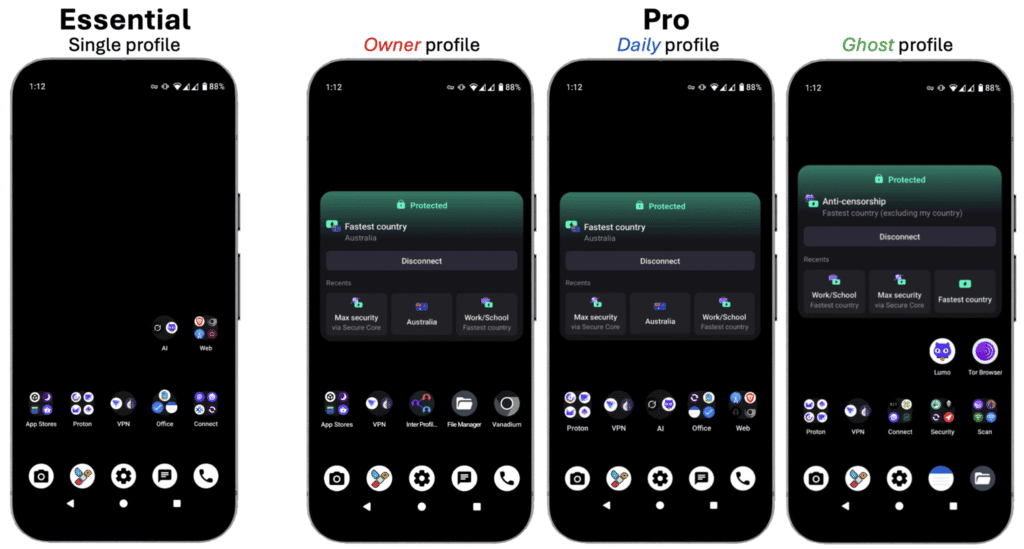
Pro Bundle arrives with three profiles already built: Owner, Daily and Ghost. You can add more, up to 32.
Storage Scopes and Contact Scopes limit what one app can see inside a profile.
On a normal phone, one compromised app or one shared gallery can see far more than it should. Separate profiles limit how far that reaches.
A profile is a complete separate user on the phone. It has its own apps, files, accounts and encryption keys. You can also control whether that profile can make calls or send texts, on the SIM or the eSIM. It is closer to carrying a second phone than to a work folder on a normal Android device.
On Essential, Owner is configured. You add Private Space, and extra profiles if you want them.
On Pro Bundle, three arrive ready:
Owner – the admin profile. Installs and updates are pushed from here.
Daily – the profile you live in, with everyday apps.
Ghost – high-sensitivity profile, kept apart, with extra tools for tracker detection and private comms.
Private Space
A hidden room inside a profile, locked with its own PIN or fingerprint. Use it when you want one or two apps out of sight without creating a whole new profile. It has its own encryption. It still shares a few conveniences with the parent profile i.e. clipboard is. See it like a hidden drawer, not a second phone.
Scopes
Fine control over what one app can see inside a profile:
Storage Scopes – the app gets the folders you name, not the full gallery and downloads.
Contact Scopes – the app gets the contacts you pick, not the full address book.
The User Manual covers how to set these up.
Common questions about isolation features
Do I have to reboot to switch profiles?
No. Switch in seconds.
Does Private Space hide everything from the parent profile?
No. It has its own encryption and its own PIN. Some conveniences still pass through. The clipboard is the usual one. Hidden drawer, not a second phone.
Can I set up a profile for a child?
Yes. You decide which apps exist, whether new installs are allowed, and whether calls and texts are restricted. See Privacy Phones for a child or teenager.
Separate profiles are one of the strongest practical advantages of this system. A compromised app or a messy profile stays contained.