
Phones

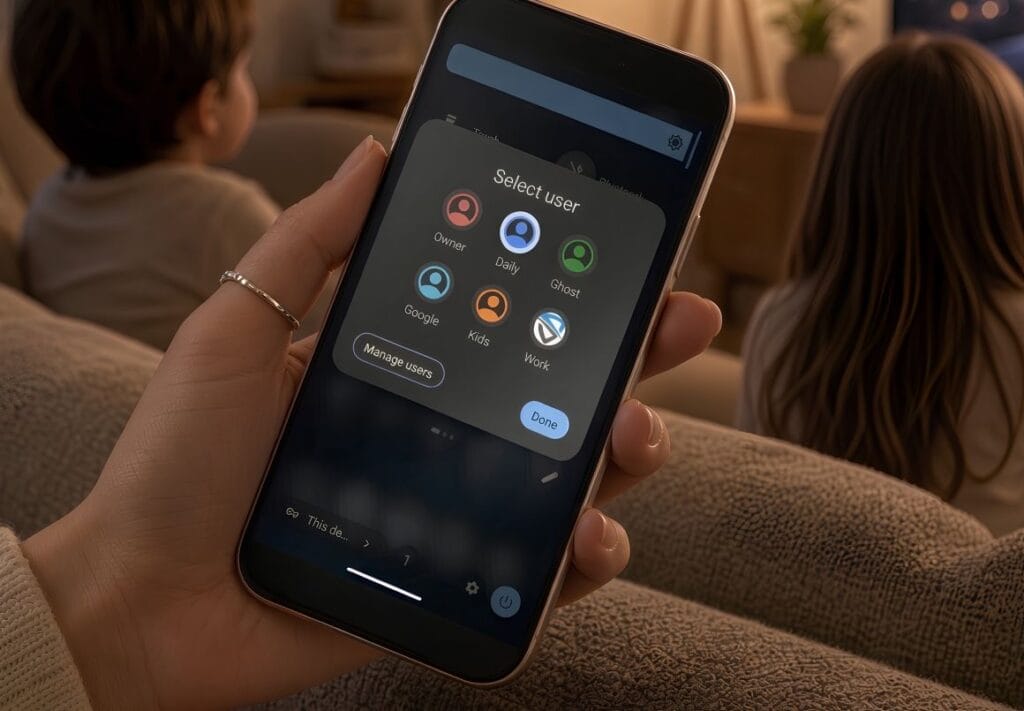
Yes. A Privacy Phone can give a child or teenager their own profile on a phone you control.

That profile has its own apps, its own PIN and its own encryption keys. You decide what is in it. While installs are switched off, they cannot add an app store and fill it themselves.

This is not a separate kids phone we sell, and it is not a monitoring service. It is a GrapheneOS feature the setup is built for. You keep Owner. They get a limited profile.

How a Privacy Phone works for kids and teenagers

  • Keep the Owner profile for yourself. Create a separate profile for the child or teenager.
  • Install only the apps you allow, and turn off new installs in their profile.
  • Restrict the SIM or eSIM if you want calls and texts switched off.
  • No Google or Apple account is required. You keep the master PIN.

A stock family phone usually comes with a Google or Apple ID in the child’s name, and an app store already open. This layout removes both.

What Australian law covers for children’s privacy

From 10 December 2025, age-restricted platforms in Australia must take reasonable steps to stop under-16s holding accounts. That removed a lot of Instagram, Snapchat, TikTok and YouTube logins. It did not remove the Google or Apple account created the day a normal phone came out of the box. It did not stop a browser opening the same sites without logging in.

From 10 December 2026, the OAIC must register a Children’s Online Privacy Code. The dates are in Australia’s Privacy Law Changes. Neither rule removes tracking from stock Android or iOS.

Why Family Link is not a privacy fix

Family Link and Screen Time need a platform account on the child. You see more, but the company does too.

A Privacy Phone works the other way. You decide what exists in the profile. You do not get a live feed of their chats. Google does not get a childhood file from the operating system. An app you then allow can still collect what you permit it to collect.

Screen time, sleep and the habit itself are a separate problem. That guide is Device Addiction with Kids.

How profiles work for a child or teenager

A profile is a real user. Its own apps, files, keys and PIN. An app in one profile cannot read another. You switch in seconds. See Isolation features.

Owner is yours. It takes updates and pushes apps into the profiles you manage. After a restart, Owner unlocks first, then they switch. Give them their own PIN. Keep Owner’s PIN as the master key.

When you add the profile you can block new installs and restrict calls and texts. If TikTok is not installed, it is not in that profile.

Private Space is a hidden drawer inside a profile. It is the wrong tool for a child. Use a full extra profile.

Optional Private DNS in Owner, such as Cloudflare for Families or NextDNS, blocks many adult and phishing domains. It is a layer, not a wall. A browser can still reach what DNS does not catch.

Essential or Pro for a kids Privacy Phone

Essential arrives with Owner ready. You add their profile with the User Manual.

Pro Bundle arrives with Owner, Daily and Ghost already built. Their room is best created as a fourth profile. The 20-minute support call can cover the layout once. A longer walkthrough is a consultation. See Essential or Pro Bundle.
privacy phone for kids teenagers in Australia 2026

What a Privacy Phone will not do for kids

  • It will not show you their messages or photos from inside their profile. Isolation works both ways.
  • It will not replace a basic handset with no internet, for a young child who only needs to call home. This layout is for a child or teenager who needs maps, messages or a browser.

Common questions about Privacy Phones for kids and teenagers

Will you set up the child’s profile before the phone ships?

  • Not as a set option. The manual has the steps. The Pro Bundle support call, or a consult, can walk you through it so you keep control afterwards.

Can a child open Instagram in the browser?

  • If the site loads, yes. Take the app off. Decide whether a browser stays in that room at all. That is the control.

What about a school app that needs Google?

  • Sandboxed Play in their room only. Do not put a Google login in Owner.

Does Australian law require a Privacy Phone for kids?

  • No. The Privacy Act (1988) and the children’s code govern organisations. They do not strip tracking from a stock phone.

Start with a configured Privacy Phone. Keep Owner. Give them a limited profile, and control what’s in it.

-> Shop Privacy Phones

-> See all FAQs

best secure private anonymous phone privacypros australia

A Privacy Phone and a jailbroken or rooted phone both promise more control. They get there by opposite means.

A PrivacyPros phone is a new Australian Pixel running GrapheneOS, with the bootloader relocked. Google’s tracking layer is gone. Verified Boot, the sandbox and the updates stay on.

Jailbreaking an iPhone, or rooting Android, punches through that lock so you can change anything. Malware can change it too.

How a Privacy Phone differs from a jailbroken or rooted phone

  • Root and jailbreak trade the factory security model for deep customisation.
  • A GrapheneOS Privacy Phone keeps that model and still removes stock tracking.
  • You do not need root for the sensor switches, the profiles, or the private app stores.
  • Australian Banks often refuse a rooted phone. Most banks run on ours with sandboxed Play.
  • We do not support rooting a phone we sold. It undoes the model we shipped.

Privacy Phone vs jailbroken or rooted phone

Privacy PhonesJailbroken iPhones / Rooted Android
PrivacyStock OS tracking removed; strong togglesSome tracking can be cut; new leaks are common
Security modelVerified Boot relocked; sandbox and updates stayCore protections bypassed
StabilityNormal Android day-to-dayOften unstable. Breaks are common
Ease of UseFeels like a normal Android after professional setup.More technical and requires ongoing maintenance.
UpdatesUp to 7 years on supported PixelsOften lost after an OS update
Risk LevelLow. Designed with security as a core feature.High. Increased exposure to malware and instability.
MaintenanceLow after setupRe-root / re-jailbreak
AppsMost work; sandboxed Play if neededSome banks and apps refuse rooted devices
Best forPrivacy without living in a workshopAdvanced users who accept the risk for customisation

Common questions about jailbreaking and rooting

Is GrapheneOS rooted?

  • No. It is a replacement operating system with Verified Boot relocked. That is the opposite of root. See what is GrapheneOS.

Can I root a PrivacyPros phone later?

  • We do not support that. It would undo the bootloader lock and the checks we shipped.

Will my bank app work on a Privacy Phone?

  • Most major Australian banks work with sandboxed Play in the profile that needs them. Many banks block a rooted device. See De-Googled Phones in Australia.

Do I need to be technical to use a Privacy Phone?

  • No. We do the configuration. A jailbreak is the path that needs a workshop.

Jailbreak and root trade the lock for control. A Privacy Phone keeps the lock, and still takes Google out of the operating system.

-> Shop Privacy Phones

-> See all FAQs

best secure private anonymous phone privacypros australia

Not every privacy phone in Australia is the same product.

A Pixel de-Googled with GrapheneOS is the right base. What you buy from a seller is the hardware history, the hours of configuration, the warranty path, and whether anyone in Australia still answers after it ships.

In Australia 2026, results mix four offers:
  1. a DIY flash guide
  2. a seller who installs GrapheneOS and posts the box
  3. a refurbished or grey-import unit with a privacy system on it
  4. a professionally configured new Australian Pixel, with support around it.

Quick answer: PrivacyPros vs other privacy phones

  • PrivacyPros is the last of those four. New Australian Pixel stock, GrapheneOS, 4-7+ hours to standards on a 100+ point checklist, a two-year manufacturer warranty, and Australian manuals.
  • Pro Bundle adds Owner, Daily and Ghost profiles, a year of Proton Unlimited with the account set up, and a Faraday bag. That split is in Essential or Pro.
  • We are not the only GrapheneOS seller in Australia. We sell a ready device and a stack, not an install job with a chat handle.
  • A cheap listing can still be GrapheneOS. It can also be a used board, a 12-month seller promise, and a forum link. That is not the same phone.
  • We do not claim to be “Australia’s leading provider”. That is not a measurable fact.

What other privacy phones in Australia actually are

  1. DIY is free if you will lock the bootloader, keep updates current, and live with the learning curve. Support is you and a forum. A half-finished flash is worse than stock.
  2. Flash-and-ship is GrapheneOS installed, bootloader relocked, box sent. The operating system is real. The hours of app vetting, sensor policy, profile layout and Australian usability are not. After-sales is often a generic inbox or an overseas chat. “Same-day dispatch” is a common sign you are getting this.
  3. Refurbished or grey importis the lower price. Unknown battery, unknown parts, unknown import path. Warranty is often 12 months, or a promise from the seller, not a two-year manufacturer path on new Australian stock. Some still call this a secure privacy phone in Australia without saying the device is used, with an unknown history.
  4. Professionally configured new new Australian stock is hardware you can verify, configuration you can read in a manual, and a registered Australian company that still answers after dispatch. That is what we sell.
Choosing a private phone australia 2026

What to check before you buy a privacy phone in Australia

Ask in writing, and keep the answers – use their business email (red flag if they use a Gmail) and not a WhatsApp chat:

New Australian-sourced Pixel, or refurbished or grey import?

  • Used units can run GrapheneOS. They do not come with the same history, or the two-year manufacturer warranty.

Warranty length?

  • “We warrant it” is a seller promise. A 2-year OEM warranty on new Australian Pixel stock is a manufacturer path. Ask who do you contact in month 14 if the screen or battery fails, who pays freight, and whether installing GrapheneOS is treated as voiding cover (on Pixels it should not).

What is on the phone on day one?

  • What level of configuration is being done? “GrapheneOS is installed” is a flash. Ask what else is done: sensor and network defaults, app stores, app ecosystem, profiles, app sync across profiles, leak checks, usability setup, Australian quick start plus a manual. If the answer is the operating system and a forum link, you are finishing the build.

Who is legally selling it?

  • A trading name and a messenger handle are not an ASIC company. No ABN means no clear warranty path.

Does the website look built, or AI generated?

  • An AI-built site with fake “workshop” photos, stock padlocks and “military-grade” is not proof of fraud. It’s a shortcut. Shortcuts on the website often match shortcuts on a privacy device. Look for real Pixel photos, a real ABN, and answers to the questions above. An AI-detector score is optional to help determin, and not a verdict.

Three product names, one phone.

  • Some Australian listings sell an “Extreme” private phone, a “Secure” phone and a “DeGoogled” phone as if they were different products. Read the specs. Same Pixel. Same GrapheneOS. Same flash. The gap is often a few toggles – exploit-protection switches, USB policy, a profile label – dressed as three tiers so the site can rank for every keyword at once: de-Googled, secure, private, encrypted, extreme. GrapheneOS is one operating system. It is not a separate extreme OS. If they cannot show, in writing, what is actually different for the extra money, you are paying for labels. Our Essential and Pro difference is hours spent by our Pros’, depth of configuration, profiles on arrival, app ecosystem, purchased software, account setup, and what you receive – not a renamed flash.

PrivacyPros vs other providers

PrivacyProsOther Providers
Setup4-7+ hour on our standards (see FAQ). Profiles and apps preparedGrapheneOS flashed, or a DIY guide. You finish the rest with DIY
HardwareNew AU-sourced Pixel. 2-year OEM warrantyOften used, refurbished or grey import. Shorter or seller-only warranty
CommunityFree privacy workshops across Australia. Donations to GrapheneOS. Ethical partnershipsOften transaction-only
Guides & SupportQuick Start Guide + full User Manual. Pro Bundle adds a 20-minute callGeneric/AI notes, a forum link, or little after box arrives
In the box (Pro Bundle)1-year Proton Unlimited (~$200), account setup, premium Faraday bag, camera covers + morePhone only, or extras sold separately
EcosystemPrivacy phones, laptops, accessories, off-grid comms, 150+ free tools, consultsUsually handset only
Who it is forEveryday Australians – families, professionals, non-technical usersOften overly technical for beginners

What we will not claim

  • We do not claim to be “Australia’s leading provider” or “Australia’s best private phone”. Those are not measurable facts and misleads consumers.
  • We do not claim the Privacy Act requires a GrapheneOS phone. The Act governs organisations after they hold your data. The phone reduces how much leaves the device.
  • We do not guarantee every bank or government app. Most work. A few insist on Play Services, which is why sandboxed Play is an option. Ask about an app before you buy.
  • We do not hide you from a carrier while a SIM is on. No GrapheneOS seller can. Metadata retention still applies. Identity checks still apply for an Australian mobile number.

We support the phones we configure. We cannot take on a device bought from another seller.

Common questions

Is a de-Googled phone different from a secure phone or an extreme private phone?

  • Not if they are the same Pixel, on the same GrapheneOS, with a few toggles changed. Those words are search terms, not grades of the operating system. A real tier is hours of work, profiles on arrival, accounts set up, and support.

What if a seller says take it to JB Hi-Fi?

  • Treat that as part of the product. GrapheneOS is not a stock-Android counter job. In mid-2026 we asked 10 Australian electronics stores whether they could support a de-Googled Pixel. One person recognised what we meant. That is not a slight on those stores. They cannot maintain a build they did not install.

Compare sellers on hardware you can verify, configuration you can read, and support that stays in Australia.

-> Shop Privacy Phones

-> See all FAQs

best secure private anonymous phone privacypros australia

These terms sit on top of your rights under Australian Consumer Law (ACL). Nothing here limits those rights.

Quick answer:
  • Every Privacy Phone has a two-year manufacturer warranty on new Australian Pixel stock. Installing GrapheneOS does not void that cover
  • A fault in normal use, a screen, a battery or a board, follows the consumer guarantees. A major failure is a refund. A minor one is a repair or a replacement.
  • We do not accept change-of-mind returns. That is disclosed before you buy.
  • Once we have started sourcing or configuring, the sale is final. If you have only just paid and that work has not begun, usually the first 24 to 48 hours, contact us.
  • We do not transfer money for postage. A claimed fault gets a prepaid label or a collection, after we verify the order. We inspect the phone when it arrives.
How a warranty claim works

Use the contact form and choose Warranty, Returns and Cancellations. Tell us the order number and what failed. Photos help. We verify the order is ours.

If it is a claimed hardware fault, we send a prepaid return label or arrange collection. Send it in the original packaging with proof of purchase. We do not pay you, we pay the courier.

When the phone is back, we inspect it and liaise with the supplier. A confirmed fault is repaired, replaced, or refunded, as the consumer guarantees require. If the phone is not faulty, or the damage is not covered, we return it to you and the return cost is yours.

What is covered under the warranty

Manufacturing defects. A battery, a screen or a board that fails in normal use.

What is not covered under the warranty

  • Deliberate or accidental damage
  • Cosmetic damage (scratches, dents)
  • Liquid damage
  • General wear and tear
  • Repairs you organised yourself

Returns

These are configured devices. Returns follow Australian Consumer Law (ACL) for faulty or wrongly described goods. We do not accept a return because you changed your mind.

Cancellations

Once payment has cleared and we have started sourcing or configuring, the sale is final. The hours are the product. If that work has not started, use the same contact form. We will tell you whether a refund is still possible.

Common questions

Does GrapheneOS void the warranty?

  • No. On a new Australian Pixel, the manufacturer path still covers a hardware fault.

Can I return it if I change my mind?

  • No. Change of mind is not a consumer guarantee, and it is disclosed before purchase.

Who pays postage?

  • On a claimed fault, we send a prepaid label or arrange collection after we verify the order. We do not transfer money. If the phone comes back and there is no fault, or the damage is not covered, the return cost is yours and the phone goes back to you.

Can I cancel after I pay?

  • Only if we have not started sourcing or configuring, usually the first 24 to 48 hours. Contact us. Once the build has started, the sale is final.

What if I say it is broken and do not send it?

  • Nothing happens. No label is used, no refund is paid, and the order stands. A claim starts when the phone is back with us.

-> Shop Privacy Phones

-> See all FAQs

The model is a phone you can run yourself. We do the hours before it ships, so you’re not sitting in a ticket queue.

Quick answer:

  • Every Privacy Phone ships with a Quick Start Guide and a full User Manual, written for Australian networks and apps.
  • Pro Bundle includes one 20-minute support call. Essential does not.
  • There is no unlimited one-on-one support after purchase. A longer walkthrough is a booked consultation.
  • A hardware fault, the screen, the battery or the board, sits on the two-year Australian manufacturer warranty. That is a separate path from a how-to question.
  • A flash-and-ship listing often leaves you with a forum link. Unlimited chat usually means a higher price or a thinner build. This split is deliberate.

What’s included with Privacy Phone support

  • The Quick Start Guide is enough to use the phone the day it arrives.
  • The User Manual covers migration, settings, apps, alternatives, Pro Tips, and the steps most people ask about. It is written for a beginner, and for someone who will push the system.
  • Pro Bundle adds one 20-minute call. Use it for the layout, not for a hardware fault. See Essential or Pro.

What is not included with support

We are a small team. We do not offer unlimited one-on-one support after purchase. That is how the price stays where it is, and how the hours go into the phone before it ships.

For a longer walkthrough, or an ongoing setup, book a consultation.

For everything else, use this order:

If something breaks on a Privacy Phone

Screen, battery, board. Two-year manufacturer warranty on every Privacy Phone. Use the warranty option on the contact form. Installing GrapheneOS does not void that on a new Australian Pixel.

Common questions

How long is the Pro Bundle support call?

  • Twenty minutes with one of our friendly team members.

What if I need more than the manual?

  • We provide ample links, tutorials and guidance in our User Manuals. If more support is required, consider booking a consultation.

Who do I contact in month 14 if the screen fails?

  • We provide warranty support for 2 years. Please use the path on the contact form.

Our goal is to set you up for success from day one.

-> Shop Privacy Phones

-> Book a Consultation

-> See all FAQs

best secure private anonymous phone privacypros australia

A Privacy Phone is a new Australian Pixel, de-Googled with GrapheneOS. The configuration standards are the 4-7+ hours of work by our Pros on top of that operating system, using a 100+ point checklist.

Our goal is to provide a private phone that sets a higher standard in Australia, with configuration focused on privacy, security, usability and resilience.

Anyone can flash GrapheneOS. The secure phone we sell is hours spent by our experts using a 100+ point checklist. Essential is about 4 hours. Pro Bundle is 7+ hours. See Essential or Pro Bundle. This checklist changes when GrapheneOS or the Australian threat model changes.

What the configuration hours cover

  • No Google telemetry from the operating system. The phone does not report home in the background.
  • One-tap kill switches for the camera, microphone, location, sensors and network, already in Quick Settings.
  • Wi-Fi and Bluetooth turn themselves off after 10 minutes of no use. The phone stops advertising itself to nearby networks.
  • 4G as the default. Calls still work on Australian networks. You can turn 5G back on. Smaller radio surface, and better battery.
  • Location off until you grant it per app. Camera, microphone and sensors off until an app asks. Nothing is listening or watching until you allow it.
  • USB stays charging-only when the phone is locked. A cable cannot pull data while the screen is locked.
  • Auto-reboot after 18 hours locked (you can change the window).
  • Independent app stores set up (GrapheneOS Apps, Accrescent, F-Droid, Aurora). Sandboxed Play is not switched on. You can install what you need without a Google account.
  • Proton apps pre-installed (Mail, VPN, Drive, Pass and the rest), plus private browsers, encrypted messaging and offline maps.
  • Proton account setup with privacy and security settings optimised (Pro Bundle).
  • Duress PIN available (leave it off until you have read the manual).
  • Quick Start Guide and full User Manual written for Australian networks and apps.

Essential vs Pro Bundle

Both use the same standards. Pro goes further: Owner, Daily and Ghost profiles already configured, Proton Unlimited account set up, Faraday bag and accessories in the box, and a 20-minute support call.

What the standards are not

A flash-and-ship phone is GrapheneOS in a box. Ours is the hours after that: new Australian Pixel stock, a two-year AU warranty, and a registered Australian company that still answers after it ships. How that compares is in PrivacyPros vs other privacy phones in Australia.

The standards close the device layer on a de-Googled GrapheneOS privacy phone. They are not the whole stack. Accounts, the browser, privacy-first habits, a Faraday bag if you need the phone dark, and off-grid communications sit on top.

-> Shop Privacy Phones

-> See all FAQs

PrivacyPros logo

Yes. You can see nearby Bluetooth tags, look at an odd Wi-Fi network, and cut Bluetooth or Wi-Fi in one tap.

AirTags, Tiles and similar tags talk over Bluetooth at a short range. A look-alike hotspot can try to catch a connection. The phone will not jam those radios. It will show them to you, and it will let you go quiet.

How a Privacy Phone handles BLE and Wi-Fi trackers

  • Every Privacy Phone randomises the Wi-Fi and Bluetooth address, and turns those radios off after 10 minutes with no connection.
  • One tap cuts Bluetooth, Wi-Fi, sensors, and more. See kill switches.
  • Pro Bundle adds tracker scanning and alerts in the Ghost profile.
  • Put the phone in a Faraday bag when you want the radios blocked from the outside. Pro Bundle includes one.

Tracker protection on every Privacy Phone

A new address on each Wi-Fi and Bluetooth connection, so the phone is harder to follow from network to network. Wi-Fi and Bluetooth switch themselves off after 10 minutes with nothing connected. The tiles for Bluetooth, Wi-Fi, NFC and USB sit in the quick settings.

Tracker scanning on the Pro Bundle

The pre-configured Ghost profile arrives with the scanning tools. A Bluetooth scan looks for AirTags, Tiles and Find My devices nearby, alerts you, and can play a sound to help you find the tag. You can set a zone, such as home or the car, and be told when a tag enters or leaves it. A Wi-Fi scan shows hidden network names, signal strength, and a hotspot that does not look like the one you expected.

The Faraday bag in the box blocks the radios from the outside while it is sealed. Test it: phone on, bag sealed, call it. If it rings, the bag failed. See How Faraday Bags Boost Privacy and Security.

What tracker detection will not do

It will not jam a tag. It will not hide the handset from your carrier while the SIM is on. It will not replace looking in the bag, the car and the jacket. A tag in a car’s wheel arch is a physical search, not an app.

Common questions about BLE and Wi-Fi trackers

Will a Privacy Phone find an AirTag in my bag?

  • It can alert you that a tag is travelling with you, and help you make it beep. You still have to find the tag.

Does the Essential phone have the tracker scanner?

  • Essential has the radio switches and the randomised addresses. The scanning tools and the Faraday bag are on Pro Bundle. See Essential or Pro.

Does turning Bluetooth off stop all tracking?

  • It stops this phone talking to a nearby tag or hotspot. It does not stop a tag that is talking to other people’s phones, Wi-Fi beacons, and hiding a SIM.

Modern tracking devices and rogue networks are increasingly used for surveillance. Privacy Phones paired with Faraday bags gives practical, easy-to-use tools to detect, block, and respond to these tracking threats – without needing technical expertise.

If you know… you know.
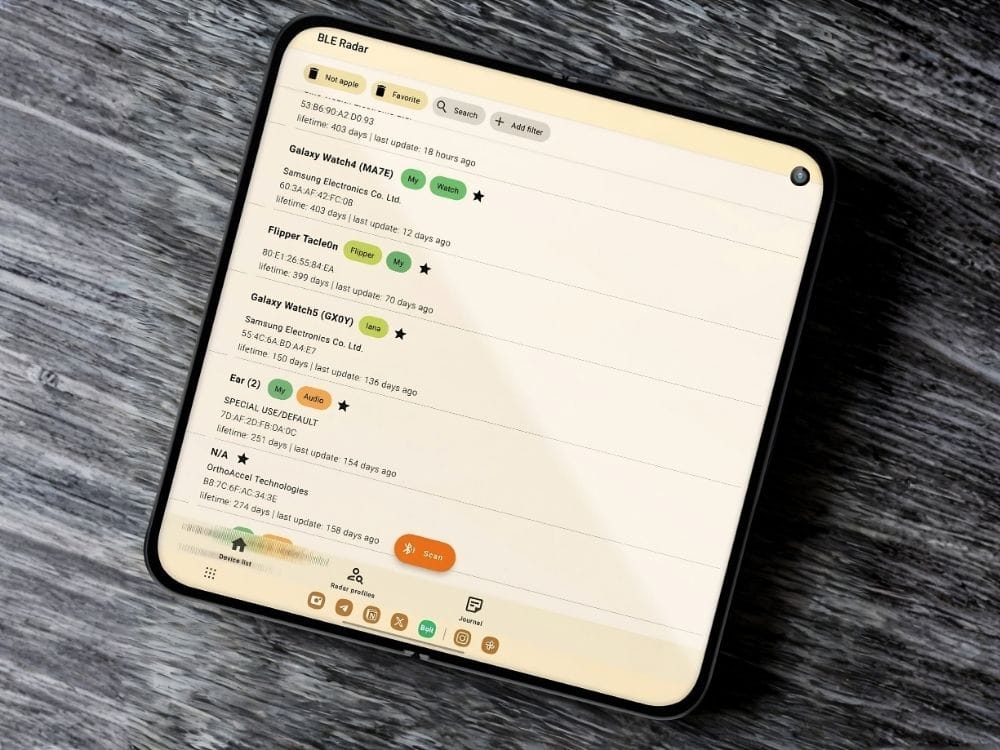
Pixel 9 Pro Fold privacy phone unfolded showing both inner screens

-> Shop Privacy Phones

-> Shop Faraday bags

-> See all FAQs

best secure private anonymous phone privacypros australia

Not while the phone is on the mobile network. Carrier tracking on a privacy phone in Australia continues while the SIM is active: the network still sees the handset identity and which tower it is using.

Telstra, Optus, Vodafone and the networks that resell them see the handset through the SIM. They see the IMEI (the unique handset identity) and which tower you are on, and they keep call and message records. In a city that location is often tens of metres. In the bush it’s much wider. Australian law requires them to keep specified metadata for at least two years. GrapheneOS does not write that away.

What a Privacy Phone changes about mobile tracking

  • GrapheneOS does not require a Google or Apple account.
  • The operating system no longer reports home to Google or Apple.
  • Carrier apps are not pre-installed.
  • You can control network, sensor and location access per app.
  • Profiles let you separate work, family or sensitive use.
  • A GrapheneOS privacy phone does not stop network-level carrier tracking.

What Telstra, Optus and Vodafone still see

While the mobile radio is on with a SIM, the carrier sees the registered service, the handset identity (IMEI) and the cell tower the phone is using. GrapheneOS cannot hide these from the carrier. The same applies to networks that resell Telstra, Optus or Vodafone.

Tools that limit mobile network tracking

ToolWhat it does
Airplane ModeRadios off. Turn Wi-Fi back on for data if you want.
LTE-Only (4G) Mode4G/VoLTE for calls. Smaller radio surface than 5G.
Network tileApps lose the internet until you allow it (kill switches)
Proton VPNHides your IP from the sites you visit.
MAC RandomisationNew Wi-Fi and Bluetooth names each connection.
Tracker ToolsPro Bundle tools for detection of trackers (tracking)
Faraday bagNo radio in or out while sealed. Included with Pro Bundle.

How people actually use this

  • At home on Wi-Fi and VoIP when they do not need a mobile number.
  • On the road with a normal number for calls, SMS and banking.
  • In silence with airplane mode or a sealed Faraday bag when they want no network contact.
  • For messages without towers, using Off-Grid devices (no SIM, no towers, no tracking).

Common questions about mobile network tracking

Does a VPN hide me from Telstra?

  • No. It hides your IP from the website. The carrier still sees that the handset is on their network, and still keeps the metadata the law requires.

What is metadata retention in Australia?

  • Carriers and relevant providers must keep specified telecommunications metadata for at least two years under the Telecommunications (Interception and Access) Act 1979. This includes subscriber and device identifiers, source, destination, date, time, duration, type of service, and location of equipment (such as cell towers). It does not require retention of message content or full internet browsing history.

Can police track my phone in Australia?

  • Agencies can lawfully seek telecommunications data under the TIA Act with the required authorisations. This is not the same as a consumer “track my phone” button. The data that can be requested includes the metadata carriers are required to retain.

Does airplane mode stop carrier metadata?

  • Airplane mode stops new cellular contact while the radio is off. It does not erase metadata the carrier already holds.

What about IMEI tracking?

  • The IMEI identifies the handset to the network. While the phone is connected, the carrier already sees the IMEI. IMEI blocking (used for lost or stolen phones) stops the handset working on Australian networks; it does not locate the phone.

Does a Faraday bag stop phone tracking?

  • A sealed Faraday bag blocks radio in and out, including cellular, and typically Wi-Fi, Bluetooth and GPS reception while sealed. It does not delete past carrier records.

Is off-grid a phone number?

  • No. Off-grid mesh devices send messages between radios without a SIM or towers. They are not a phone number.

A GrapheneOS privacy phone reduces the tracking that happens on the device itself. When you need no SIM and no towers, consider off-grid private communications.

-> Shop Privacy Phones

-> Shop Off-Grid

-> Shop Faraday Bags

-> See all FAQs

best secure private anonymous phone privacypros australia

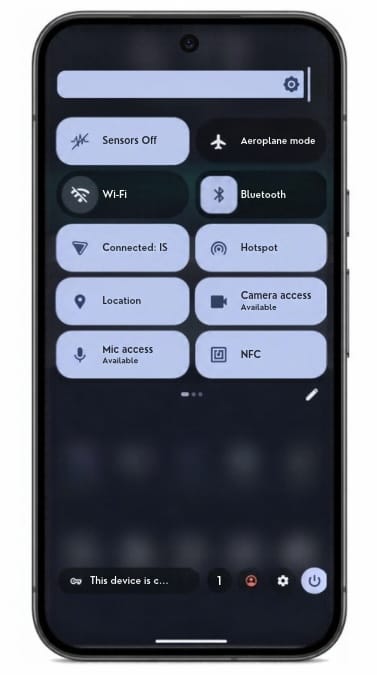
Kill switches are one-tap tiles that turn off the camera, microphone, location, sensors, network, NFC or USB. They cut the path in the operating system. An app cannot flip it back on.

A permission screen is an app asking. A kill switch is the system refusing the hardware. Camera off means camera off, including to an app that already had permission.
How kill switches work

  • Flip the tile. That hardware stays off until you turn it back on.
  • Use it in a meeting, at a security point, or when you want the phone quiet.
  • The ones you will use most sit in the quick-settings shade. One tap.
  • For a full radio blackout, put the phone in a Faraday bag. Pro Bundle includes one.

What you can turn off

  • Camera
  • Microphone
  • Location / GPS
  • Sensors (motion, gyro, accelerometer and the rest)
  • Network (Wi-Fi, mobile data, Bluetooth)
  • NFC
  • USB
Privacy Phone quick settings with camera, microphone and sensor switches off

Work and personal separation is profiles – a different control. See Isolation features.

The Faraday bag

The tiles quiet the phone from the inside. A Faraday bag blocks all the radios from the outside as well. Pro Bundle includes a Mission Darkness Faraday bag for phone.
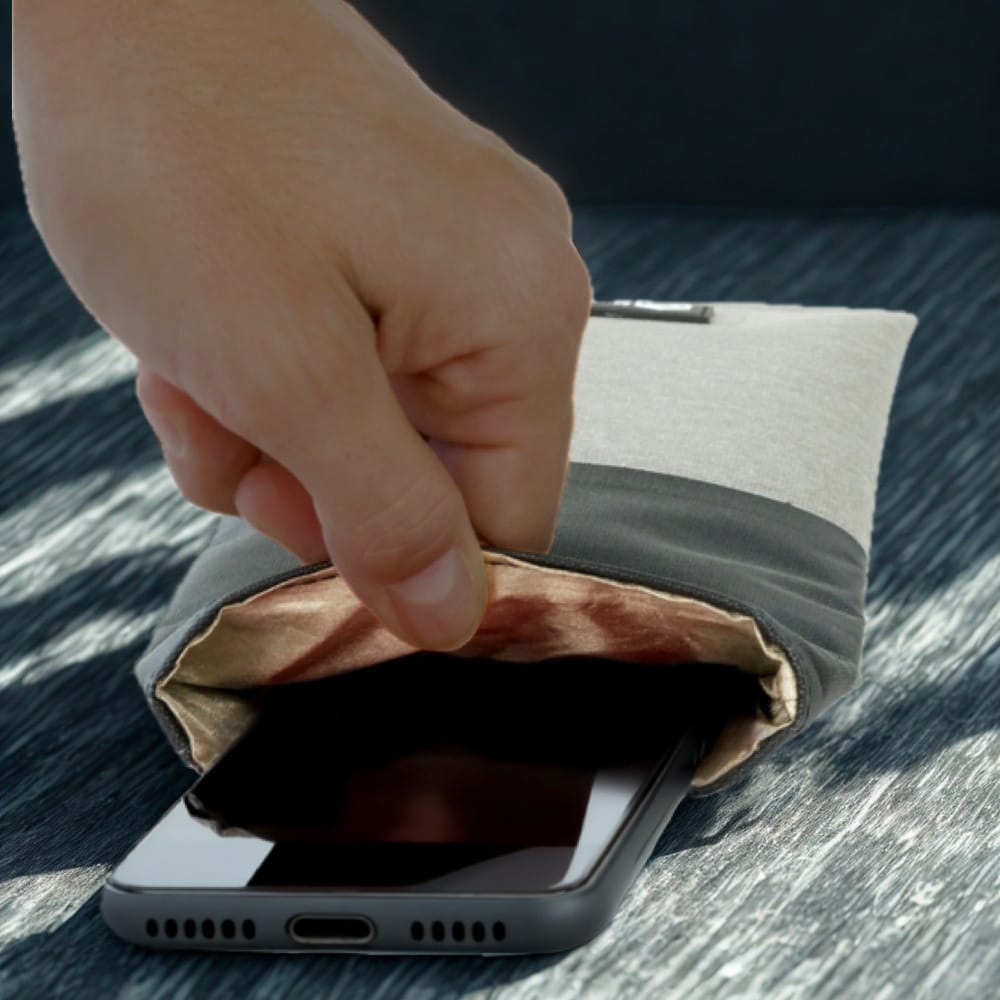
Phone faraday australia

Common questions

Is a kill switch the same as a duress PIN?

  • No. Kill switches turn hardware off. A duress PIN wipes the device.

Can an app turn the camera back on?

  • Not while the tile is off. The switch is enforced by the system, not by an app you hope is telling the truth.

Do kill switches hide me from my carrier?

  • No. The network tile stops the phone using Wi-Fi and mobile data. It does not erase metadata the carrier already holds, and it does not hide a SIM that is still registered. The Faraday bag is the step when the radios themselves should be silent.

-> Shop Privacy Phones

-> Shop Faraday Bags

-> See all FAQs

best secure private anonymous phone privacypros australia

We do ship overseas, however we build and support Privacy Phones in Australia first.

If you live outside Australia, contact us before you order. We quote the phone, the insured courier, and the terms. Nothing is dispatched until that quote is agreed and payment has cleared.

Process for overseas Privacy Phone orders

  • Send the model you want, Essential or Pro Bundle, and the destination.
  • We come back with a price and a transit estimate.
  • The phone is the same product: a new Pixel, de-Googled with GrapheneOS, configured before it ships.
  • The two-year manufacturer warranty is the Australian stock path. What that means in your country is part of the quote.
  • The website will show full export options when that lane is ready. Until then, it is contact us.

Common questions

Can I just check out and ship overseas?

  • Not yet. Contact us first. We confirm the destination, the courier and the terms before you pay.

Does the two-year Australian warranty apply overseas?

  • The manufacturer path is on Australian stock – see our policy. How a fault is handled in another country is confirmed in the quote. Do not assume a local shop will service a phone they did not sell.

Is GrapheneOS legal outside Australia?

  • Check with your local laws. GrapheneOS is free open-source software on a phone you own. Local identity rules for a SIM still apply in your country, the same way they do here.

Do you ship the Faraday bag and Proton with an overseas Pro Bundle?

  • Pro Bundle is the same build. What can be included in the export, and what Proton can activate in your country, is confirmed in the quote.

-> Contact Us

-> Shop Privacy Phones

-> See all FAQs

best secure private anonymous phone privacypros australia

The greenest phone is the one you do not replace.

Current Pixels are built for a long support life. GrapheneOS keeps that window open. A handset you can still update in year six is a handset that does not become e-waste in year three.

How a Privacy Phone is the longer-life choice

  • We sell new Australian Pixel 9 and Pixel 10 phones, so the clock starts with years left, not a used phone already halfway through.
  • Google’s own figures for the Pixel 10 series put recycled content at least 32% by weight, including recycled aluminium in the enclosure and recycled cobalt in the battery. That is Google’s number, not ours.
  • Pixel 8 and newer carry up to seven years of security updates from launch. GrapheneOS ships patches for as long as that firmware exists.
  • A used phone with a tired battery and no manufacturer warranty often comes back as waste sooner. That is the refurbished phones page, not a carbon certificate.
  • We do not sell a short-life refurb dressed as a green phone.

What lasts on a Privacy Phone

The software years are the real saving. A phone you replace every two years costs more, in money and in materials, than a phone you keep. The seven-year window on current Pixels is the ceiling. GrapheneOS follows it. After Google stops the firmware, the useful life ends. Buy the generation with the years still in front of it.

The hardware content is Google’s. Recycled aluminium, recycled rare earths in the magnets, recycled cobalt in the cell, on their published figures for this generation. We do not add a second certificate on top of that.

Packaging from us is plastic-free, from the Pixel box through how we send it.

Common questions

Is a refurbished phone greener?

  • Sometimes on paper, because the shell already exists. In practice a tired battery and a short update life mean it is replaced sooner. New stock with years of patches left is the longer life. Used phones also have their risks.

Do you offset carbon?

  • No. We do not sell an offset. We sell a phone you can keep.

Does GrapheneOS extend the update window past Google’s?

  • No. It follows the firmware Google still ships. That is why the model you buy matters.

-> Shop Privacy Phones

-> See all FAQs

best secure private anonymous phone privacypros australia

Yes, when the house runs locally. The phone is a remote. We do not configure your hub.

How a Privacy Phone works with a smart home

  • Install Home Assistant or openHAB on the phone. Join the same Wi-Fi as the hub.
  • Put the house apps in their own profile if you want them fenced off.
  • Sandboxed Play is there if a vendor app insists. It is off at dispatch.
  • A Google Home or Alexa house sends the building to someone else’s cloud. A local hub keeps that traffic on your network.
  • The phone does not invent that setup. It refuses to make a Google account the front door.

What works well with a Privacy Phone

  • Home Assistant Companion. Dashboards, automations, and voice on the hub, not in Google.
  • openHAB, if that is already the brain of the house.
  • Bluetooth devices. Pair, then let the radio sleep. Every Privacy Phone turns Bluetooth off after 10 minutes with no connection, so the handset is not sitting there advertising. Turn it back on when you next pair.

What a Privacy Phone adds to a smart home

  • The network tile cuts an app’s internet, so the companion can stay on local Wi-Fi only. See kill switches.
  • A separate profile puts the camera app in its own room, away from mail. See isolation features.
  • MAC randomisation makes the phone harder to follow from network to network. It does not make it invisible on your own Wi-Fi.

Google Home and Alexa on a Privacy Phone

Those apps expect a Google or Amazon account. They are not the default. If you still need one bridge, sandbox it and keep it off the profile you live in. A separate profile is the clean way. How to add the app is in install apps on a Privacy Phone.

Common questions

Will Home Assistant work without a Google account?

  • Yes. That is the point. The companion app talks to your hub.

Do you set up the smart home?

  • No. We ship the phone. The hub, the lights and the automations are yours.

Can a vendor camera app still phone home?

  • Yes, if you allow it the network. Put it in its own profile, and use the network tile when you want it local only.

-> Shop Privacy Phones

-> See all FAQs

best secure private anonymous phone privacypros australia
Loading...
