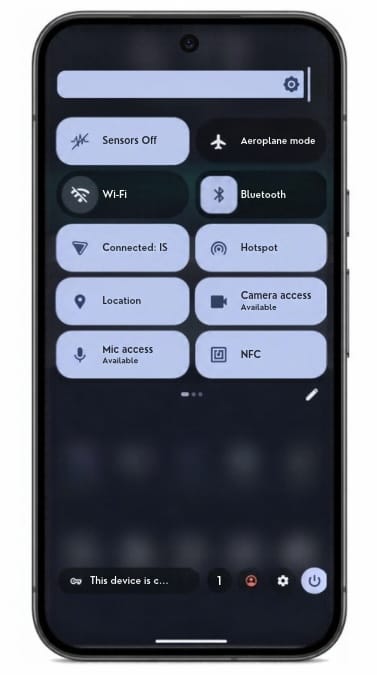
Kill switches are one-tap tiles that turn off the camera, microphone, location, sensors, network, NFC or USB. They cut the path in the operating system. An app cannot flip it back on.
A permission screen is an app asking. A kill switch is the system refusing the hardware. Camera off means camera off, including to an app that already had permission.
How kill switches work
Flip the tile. That hardware stays off until you turn it back on.
Use it in a meeting, at a security point, or when you want the phone quiet.
The ones you will use most sit in the quick-settings shade. One tap.
For a full radio blackout, put the phone in a Faraday bag. Pro Bundle includes one.
What you can turn off
Camera
Microphone
Location / GPS
Sensors (motion, gyro, accelerometer and the rest)
Network (Wi-Fi, mobile data, Bluetooth)
NFC
USB
Work and personal separation is profiles – a different control. See Isolation features.
The Faraday bag
The tiles quiet the phone from the inside. A Faraday bag blocks all the radios from the outside as well. Pro Bundle includes a Mission Darkness Faraday bag for phone.
Common questions
Is a kill switch the same as a duress PIN?
No. Kill switches turn hardware off. A duress PIN wipes the device.
Can an app turn the camera back on?
Not while the tile is off. The switch is enforced by the system, not by an app you hope is telling the truth.
Do kill switches hide me from my carrier?
No. The network tile stops the phone using Wi-Fi and mobile data. It does not erase metadata the carrier already holds, and it does not hide a SIM that is still registered. The Faraday bag is the step when the radios themselves should be silent.