Personal data is the new gold. Apps collect your personal data in Australia by combining what you type, what you allow, what they infer from behaviour, and tracker software that fires when you open the app. This sits on top of a phone operating system that already collects location and activity, plus a telco rule that keeps certain metadata for at least two years.
Quick answer
Apps harvest personal data in four layers:
On stock Android the permission screen sits on top of Google Play Services, which collects as well.
Tracking starts fast. In a mid-2026 PrivacyPros test on a stock Android phone using DuckDuckGo App Tracking Protection, ordinary use produced these counts within 30-60 seconds:
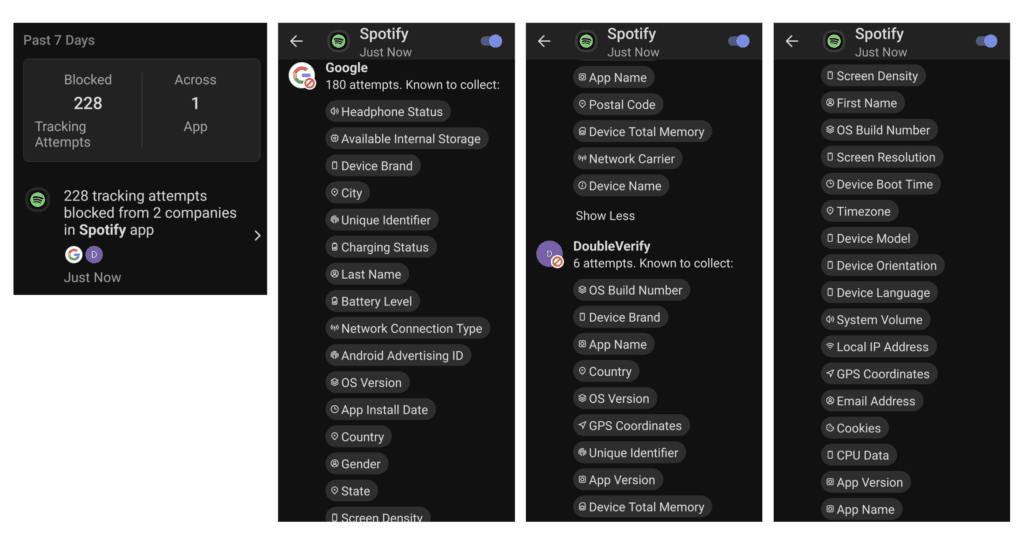
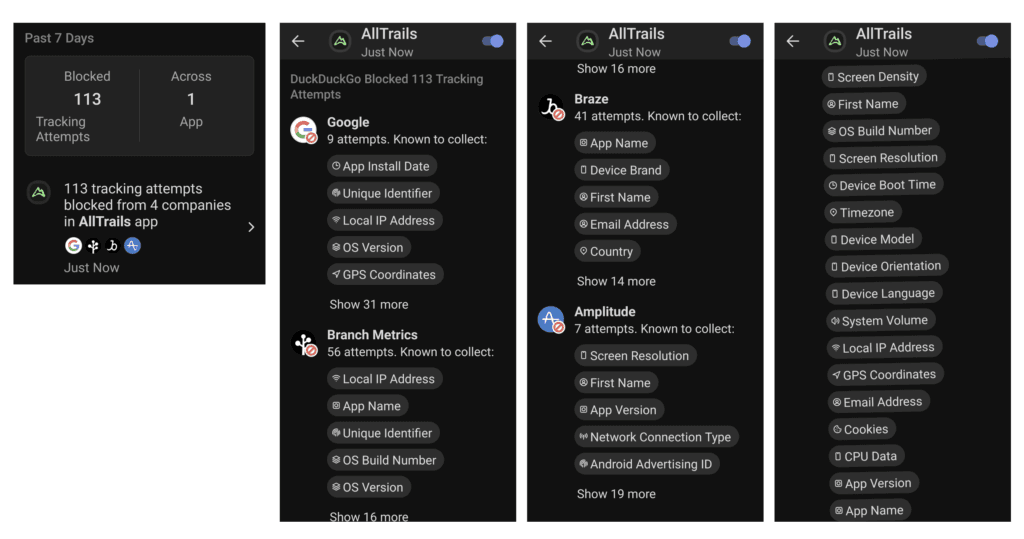
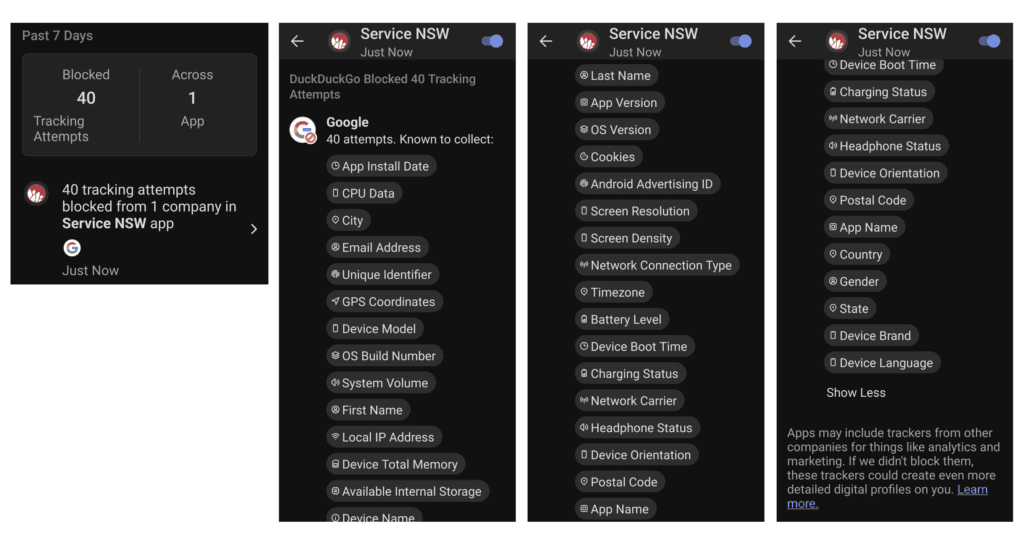
Opening the app was enough to start the requests. Service NSW is an Australian government app many people are expected to keep. Official is not the same as quiet.
Allow is a standing permission, not a one-off. Until you revoke it, the app can use that sensor when the feature needs it, and some apps use it more broadly than the feature. A flashlight app may ask for microphone and location. A calculator app may ask for camera, microphone and sensors.
Australian banking and government apps are the hard case, because people feel they cannot remove them. They can still be denied what they do not need. A bank needs a network connection. It does not need your photo library. Service NSW may need identity for a licence check. It does not need to sit in the background collecting data when you are not using it.
Most people do not read the terms. The documents are written so that is the likely outcome. Some come with time limits to rush you to agree. Look for four clauses in particular:
ToS;DR (Terms of Service; Didn’t Read) is a quick tool that grades policies from A to E. Examples:
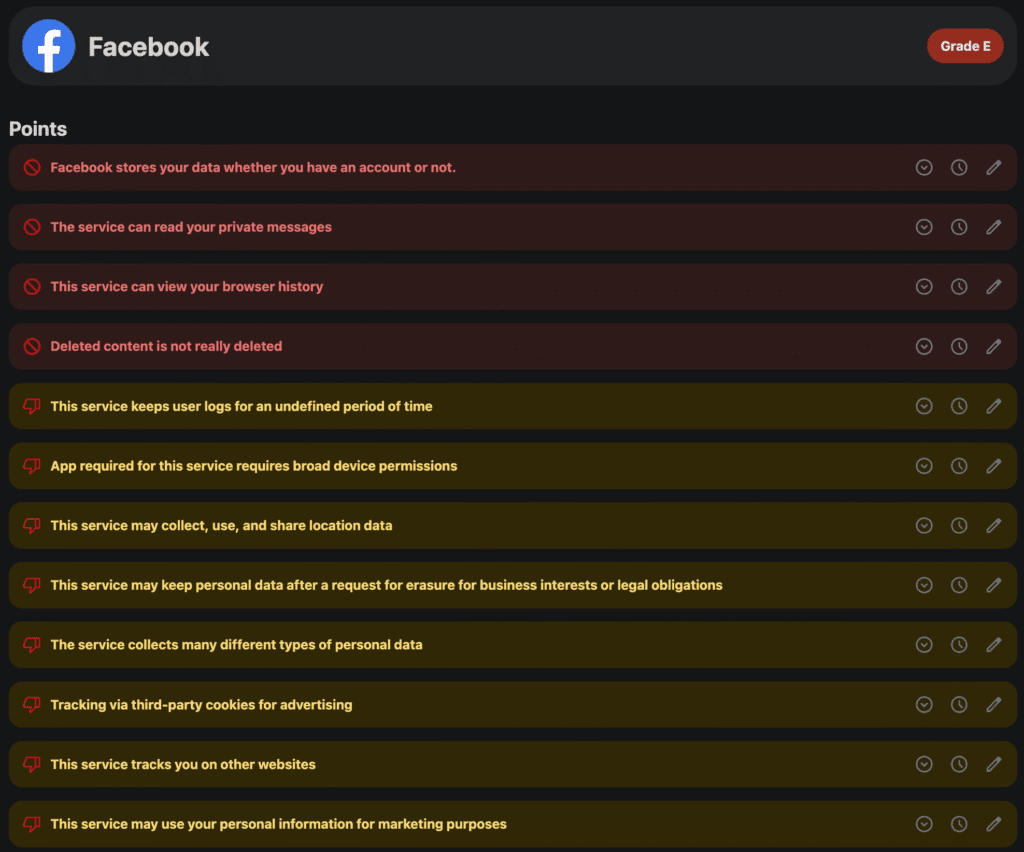
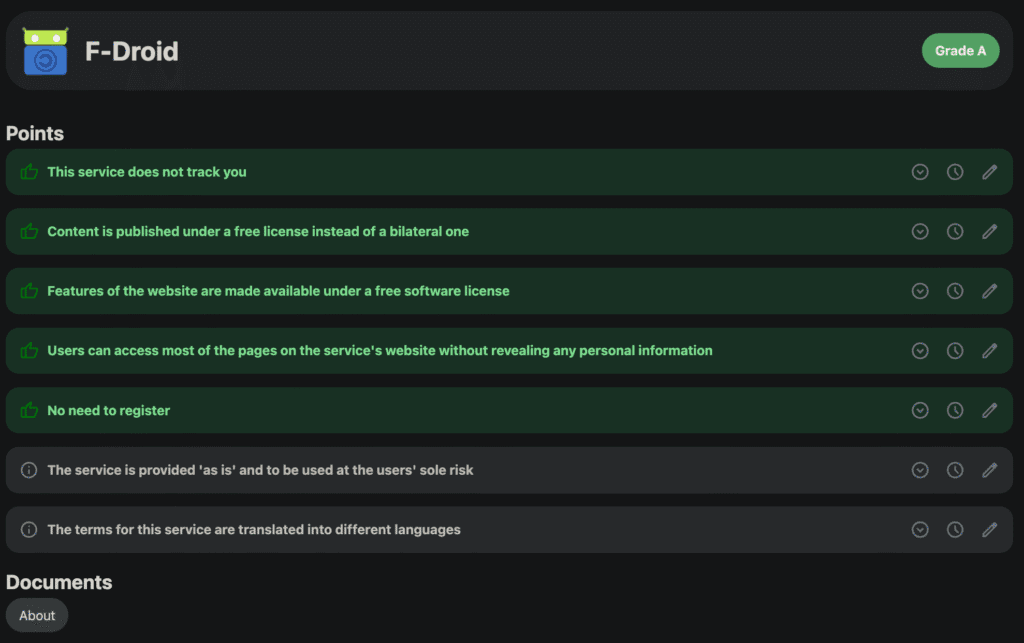
Australian law limits what organisations may do with data they already hold. It does not stop the phone from collecting and sending it.
Telcos and internet providers must retain specified non-content metadata for at least two years under the Telecommunications (Interception and Access) Act 1979. This includes the source and destination of a communication, the time and duration, the type of service, and location of the equipment used. They are not required to keep the content of the communication or web browsing history under that rule. Subscriber details are kept for the life of the account and two years after it closes.
From 10 December 2026, many organisations must say in their privacy policy when a computer program uses personal information to make, or substantially inform, a significant decision about you. That is a disclosure rule. It is not a switch on the app.
See guide: Australia’s Privacy Law Changes.
In March 2026 the Australian Community Attitudes to Privacy Survey about privacy.
The law limits what organisations may do with data they already hold. These numbers show most Australians do not feel that is enough.
Start with the apps you already have. A tracker blocker does little on a phone full of unused apps.
A microphone needs permission before an app can use it. Allow is a standing permission, not a one-off. On Android 12 and later, a status-bar indicator appears when the microphone or camera is in use. Quick Settings also includes toggles that can turn the microphone and camera off. When the microphone is off, the app receives silence. GrapheneOS keeps the camera and microphone indicators and adds Sensors and Network toggles so denials hold.
They combine what you type with permissions you allow, then send it to the app maker and to tracker kits bundled inside the app. Location, contacts, sensors and an advertising ID are the usual channels. Opening the app is enough to start the requests.
Partly. Revoke permissions, delete unused apps, and use a tracker blocker such as DuckDuckGo App Tracking Protection. That cuts third-party kits. It does not remove Google Play Services on stock Android or iCloud on an iPhone.
Yes, some can contact trackers. In our mid-2026 test, Service NSW generated 40 tracking attempts in about a minute of ordinary use. Keep the app if you need it. Deny permissions it does not need to do the job.
It can. Allow gives the app the sensor. Kits inside the app often send events to advertising and analytics firms under the privacy policy, not under a second prompt.
A microphone needs permission. Allow is a standing permission. Android 12 and later shows a status-bar indicator when the microphone is in use, and Quick Settings can turn it off. GrapheneOS keeps those indicators and adds Sensors and Network toggles so denials hold.
Fewer apps and tighter permissions on the phone you have. A configured GrapheneOS Privacy Phone if you want the operating system out of the collection. New Australian stock, 2-year Australian warranty, configured before dispatch.
Every app you use sits in a system built to extract value from your personal life. That extraction is speeding up as AI systems train on it.
Fewer apps, tighter permissions, and a phone whose operating system is not built to collect will cut what is being collected, sold, and potentially used against you.
-> Discover Privacy Tools
-> See Privacy Phones