PRIVACY HUB

Protect your personal data

Build digital resilience

150+ free tools for privacy, security and anonymity in Australia. Vetted by our Pros.

Web Browsers

Chrome and Edge collect your activity by default. A private browser blocks trackers and reduces fingerprinting from the start. We chose free options with strong defaults, less leaks, regular updates, and good results on Australian sites.

  • privacypros australia free tools tor
    Tor Browser

    Browser that routes traffic through Tor for stronger anonymity. Slower. For higher-risk browsing.

  • privacypros australia free tools Brave Search
    Brave Browser

    Browser with ad and tracker blocking on by default. Fast, and no account required.

  • privacypros australia free tools mullvad browser
    Mullvad Browser

    Browser built to resist fingerprinting. Based on Firefox, with Tor Project input. Stronger when paired with a VPN.

  • privacypros australia free tools librewolf
    LibreWolf

    Firefox with the telemetry and tracking stripped out. Stronger defaults from the start.

  • Cromite PrivacyPros Australia
    Cromite

    Android browser with ad and tracker blocking built in. Lighter than Chrome, and harder to fingerprint.

Ad & Tracker Blockers

Ads and trackers follow you from site to site. A free blocker stops the scripts. We chose extensions that update often and do not add their own. Install one. Pages load faster, and less of your browsing leaves the browser.

  • privacypros australia free tools uBlock
    uBlock Origin

    Blocks ads and trackers in the browser. Light on resources. One of the most effective free blockers.

  • privacypros australia free tools libredirect
    LibRedirect

    Sends YouTube, Reddit and similar links to private frontends automatically. One extension. Less tracking.

  • privacypros australia free tools localcdn
    LocalCDN

    Loads common website files from your browser instead of third-party servers. Faster, and fewer trackers.

  • privacypros australia free tools clearurl
    ClearURLs

    Strips tracking codes from web addresses before you open or share them. Links stop carrying a trail.

  • Privacy Badger
    Privacy Badger

    Browser extension from the Electronic Frontier Foundation that learns to block trackers as you browse.

  • Decentraleyes
    Decentraleyes

    Loads common website files from your browser instead of tracking servers. Pages are faster and leak less.

  • Cookie AutoDelete
    Cookie AutoDelete

    Deletes cookies when you close a tab. Sites do not keep the trail between visits.

  • Redirector
    Redirector

    Sends links from big platforms to private alternatives automatically. Less tracking on everyday sites.

Search Engines

Google stores every search and builds a profile. A private search engine does not. We chose free options that return useful results without logging your history, tying it to an account, or training an ad system.

  • privacypros australia free tools startpage search
    Startpage

    Google results without Google seeing the search. European privacy standards. No account needed.

  • privacypros australia free tools searXNG
    SearXNG

    Search that pulls results from many engines and does not profile you. Can be self-hosted.

  • privacypros australia free tools Brave Browser
    Brave Search

    Search engine with its own index. Does not build a profile from your queries.

  • privacypros australia free tools duckduckgo
    DuckDuckGo

    Search engine that does not build a profile from your queries. Simple switch from Google.

  • Mojeek
    Mojeek

    Search engine with its own index. Does not rely on Google or Bing, and does not build a profile from your queries.

  • MetaGer
    MetaGer

    German search engine that combines results from several sources. Does not build a profile from your queries.

Password Managers

Reusing a password means one leak opens every account. A password manager stores unique ones behind a single master password. We chose free, audited options with autofill and open-source builds.

  • Proton Pass Breach Observatory PrivacyPros Australia
    Proton Pass

    Password manager from Proton with aliases and 2FA built in. Free tier. Encrypted.

  • privacypros australia free tools
    Bitwarden

    Popular password manager with cloud sync and self-hosting options. Open-source with zero-knowledge encryption. Works well across all devices and browsers.

  • privacypros australia free tools KeepassXC
    KeePassXC

    Desktop password manager that stores everything on your computer. No cloud by default. One master password.
  • privacypros australia free tools
    KeePassDX

    Android password manager that works offline. Encrypted database stays on the phone.

  • Proton Pass Breach Observatory PrivacyPros Australia
    Proton Pass Password Generator

    Creates strong passwords in the browser. Part of Proton Pass. No need to invent them.

  • NordPass
    NordPass

    Password manager with autofill and a usable free tier. One master password for unique logins.

  • 1Password
    1Password

    One master password. Unique passwords for every site, with sharing for a family or team.

VPN

Your internet provider sees the sites you open. A VPN encrypts the connection and hides the address. We chose free or free-tier options with no-logs policies, audits, and servers near Australia. Use one on public Wi-Fi. It does not stop the phone or the app from reporting.

  • privacypros australia free tools proton vpn
    Proton VPN

    Swiss VPN with a usable free tier and a no-logs policy. Open-source apps.

  • privacypros australia free tools mullvad vpn
    Mullvad VPN

    VPN with no-logs policy and anonymous account numbers. No email required to sign up. Audited.

  • privacypros australia free tools orbot
    Orbot

    Routes Android traffic through Tor. Stronger anonymity on the phone. Open-source.

  • free tools Windscribe PrivacyPros Australia
    Windscribe

    VPN with a usable free plan and built-in ad blocking. Australian servers. Beginner-friendly.

  • Sentinel dVPN
    Sentinel dVPN

    VPN that routes through community-run nodes. Decentralised. Focus on privacy and resisting blocks.

  • IVPN
    IVPN

    VPN with a strict no-logs policy and regular audits. Paid, with a clear privacy focus.

Two-Factor Authentication (2FA)

A password is one door. 2FA adds a code that changes. We chose free authenticator apps that work offline and do not send your accounts elsewhere. Turn it on for email, banking and myGov. A leaked password then does less damage.
  • privacypros australia free tools proton auth
    Proton Authenticator

    2FA app from Proton. Encrypted. Unlimited free. Fits with Proton Mail and Pass.
  • icon ente auth
    Ente Auth

    Authenticator app with encrypted backups. Codes stay protected if you change phones.
  • privacypros australia free tools
    Aegis

    Offline authenticator for Android. Encrypted storage. Codes stay on the phone.

Online Security

A breach notice arrives after the data has already left. These tools scan for malware and check if your email has appeared in known leaks. We chose free, audited options that run with little collection.

  • privacypros australia free tools Haveibeenpwned
    Have I Been Pwned

    Checks if your email has appeared in a known data breach. One search. Clear result.

  • Proton Pass Breach Observatory PrivacyPros Australia
    Proton Pass Breach Observatory

    Checks if your logins have appeared in known breaches. Alerts inside Proton Pass.
  • ClamAV
    ClamAV

    Scans files and email for viruses and malware. Open-source. Run it when you want a check, not all day.
  • Lynis
    Lynis

    Checks a Linux or Mac system for weak settings and suggests fixes. For people who manage their own machine.
  • Hypatia
    Hypatia

    Android app that scans for malware on the device. Uses local lists. Few permissions.
  • VirusTotal
    VirusTotal

    Scans a file or link with many antivirus engines at once. Quick check before you open a download.

  • URLScan
    URLScan.io

    Checks a link for malicious scripts before you open it. Useful for suspicious messages.

  • privacy sexy
    privacy.sexy

    Applies stronger privacy settings on Windows and Mac in one go. Open-source. Beginner-friendly.
  • Blacklight
    Blacklight

    Scans a site and lists the trackers it loads. Useful before you trust a page.

Encryption

A file you can open is a file anyone with the device can open. Encryption scrambles it so only the key works. We chose free, audited tools that are simple to use. Encrypt anything sensitive before you store or send it.

  • privacypros australia free tools encrypt
    VeraCrypt

    Creates an encrypted folder or encrypts a whole drive. Open-source. For files you want locked.
  • privacypros australia free tools cryptomator logo
    Cryptomator

    Encrypts files before they go into Dropbox, Google Drive or similar. The cloud holds the file. It cannot read it.
  • privacypros australia free tools
    Picocrypt

    Encrypts a file or folder with a password. Simple. Works offline.

Deletion

Emptying the bin does not erase the file. Secure deletion overwrites it so recovery tools fail. We chose free, open-source options that work on Windows, Mac and Linux.

  • privacypros australia free tools Bleachbit
    BleachBit

    Clears cache, cookies and junk, and can overwrite free space so deleted files are harder to recover.
  • Dangerzone
    Dangerzone

    Turns a risky PDF or document into a safe copy. Useful when a file comes from someone you do not fully trust.

  • CCleaner
    CCleaner (Free Tier)

    Clears temporary files, browser junk and leftover data from the computer. Free version covers the basics.

Metadata

A photo can carry your location, the camera, the time it was taken and more. Metadata tools strip that before you share. We chose free options that clean the file in one click and leave the image usable.
  • mat2
    mat2

    Strips hidden metadata from images and documents on your computer. Batch clean before you share.
  • privacypros australia free tools Exiftool
    ExifTool

    Reads and removes metadata from almost any file. More control if you need to automate the clean.

  • exifc
    ExifCleaner

    Removes hidden data from photos, videos and PDFs. Drag, drop, done. Works offline.

  • exifv
    Online EXIF Viewer

    Shows the hidden location and camera data in a photo. Check before you share. Prefer an offline tool for sensitive images.

Fingerprinting

Sites can identify your device without cookies. Fingerprinting reads the screen, fonts and browser details. We chose free extensions and settings that cut that signal and still let sites work. Pair one with a private browser. Tracking gets harder.
  • PrivacyPros Australia free tools AmIUnique
    Amiunique

    Shows how unique your browser fingerprint is. Use it to see what sites can already identify.

  • CoverYourTracks
    Cover Your Tracks

    Tests how well your browser resists tracking and fingerprinting. From the Electronic Frontier Foundation.

  • privacypros australia free tools Browserleaks
    BrowserLeaks

    Tests what your browser leaks: IP, fonts, hardware and more. See how identifiable you are.

DNS

Your internet provider sees every site you open. A private DNS hides the names and can block known bad domains. We chose free, audited options with no logs and servers near Australia.

  • privacypros australia free tools dns
    NextDNS

    Custom DNS that blocks ads, trackers and chosen domains. Free tier. Works on phones and routers.

  • privacypros australia free tools
    Quad9

    DNS that blocks malware and phishing sites. Nonprofit. No logs. Set it once on the network.

  • privacypros australia free tools ad
    AdGuard DNS

    DNS that blocks ads and trackers before the page loads. No logs. Works on the whole network.

Private Messengers

SMS and mainstream chat apps can be read by the company or requested by others. A private messenger encrypts the conversation so only the people in it can open it. We chose free, open-source options with little metadata, including some that need no phone number. Use one for anything you would not say in public

  • Molly
    Molly

    Hardened Signal for Android. Extra encryption on the message database. Install from F-Droid.

  • Session
    Session

    Messenger with no phone number. Messages route through multiple nodes. Groups and voice notes.

  • SimpleX
    SimpleX

    Messenger with no user ID and no central server. Designed so there is no account to link the chats.

  • privacypros australia free tools Wire
    Wire

    Encrypted messenger for personal use and teams. Open-source. Can be self-hosted.

  • Jitsi
    Jitsi Meet

    Video calls with no account required. Can be encrypted. Useful when Zoom wants a login.

  • Proton Meet
    Proton Meet

    Video meetings from Proton. Encrypted. No account needed to join. Runs in the browser.

  • Berty
    Berty

    Messenger with no phone number and no central server. Works offline and over peer-to-peer.

  • Element
    Element

    Encrypted chat for groups, voice and video. Useful for a team that does not want Slack reading the room.

Email & Aliases

One email address becomes the key to every account. Aliases and private email let you sign up without handing over the real inbox. We chose free or free-tier options with strong encryption. A leak then hits one alias, not your main address.

  • Proton Mail
    Proton Mail

    Encrypted email from Switzerland. Free tier. Works with the rest of Proton.

  • Tuta
    Tuta

    Encrypted email from Germany. Free tier. Aliases on paid plans. Open-source apps.

  • Mailbox-org
    Mailbox.org

    German email with custom domains and aliases. Paid. Strong privacy focus, no free tier.
  • Simplelogin
    SimpleLogin

    Creates email aliases that forward to your real inbox. A leak hits the alias, not the main address.
  • Addy
    Addy.io

    Email aliases that forward to your real inbox. A leak hits the alias, not the main address.
  • 10-min-email
    10 Min Email

    Temporary email that disappears. Use it for a sign-up so the real address is not in another database.
  • Email-Header-Analyzer
    Email Header Analyzer (DNSChecker)

    Shows where an email came from and whether the sender address was faked. Useful before you click.

Social & Communities

Mainstream social apps build a profile from every like and follow. Private networks and communities let you connect with less of that collection. We chose free, open-source or decentralised options with stronger controls.
  • Mastodon
    Mastodon

    Social network without a central company ranking your feed. Communities run their own servers.

  • Nostr
    Nostr

    Social posts and messages where you hold the keys. No single company can delete the account.

  • Pixelfed
    Pixelfed

    Photo sharing without a central company ranking your feed. Chronological. Federated.

  • Lemmy
    Lemmy

    Forums and link sharing without a central company tracking every click. Communities run their own servers.

Handy Utilities

These utilities generate details, check terms, or point to open-source alternatives. We chose free tools that do one thing and collect little. Bookmark a few.

  • PrivacyPros Australia free tools IP address whatismyipaddress
    WhatIsMyIPAddress

    Shows your public IP, rough location and provider. Useful to confirm a VPN is on.

  • PrivacyPros Australia free tools IP finder showmyip
    ShowMyIP Speed Test

    Checks speed, latency and whether a VPN is working. Useful on Australian connections.

  • PrivacyPros Australia free tools scam detector
    Scam Detector Validator

    Rates how trustworthy a website looks. Useful before you shop or sign up. Simple check.

  • privacypros australia free tools
    Terms of Service; Didn’t Read (tosdr)

    Grades privacy policies in plain language. See what a service actually does with your data before you agree.
  • PrivacyPros Australia free tools AlternativeTo
    AlternativeTo

    Finds alternatives to apps that track. Useful when you want the job done without the profile.
  • privacypros australia free tools Jellyfin
    Jellyfin

    Stream your own movies and music from a computer you control. No company account. Nothing leaves your network.
  • PrivacyPros Australia free tools stremio
    Stremio

    Streams films and shows from sources you choose, in one interface. Open-source. Minimal tracking.

  • privacypros australia free tools iptv
    IPTV Collection

    List of free public TV channels you can play in VLC. No subscription account.

  • privacypros australia free tools steg cloak
    Stegcloak

    Hides a short message inside ordinary text. Password-protected. Useful for a discreet note.

  • privacypros australia free tools fake name generator
    Fake Name Generator

    Creates realistic fake names and details for forms and test sign-ups. Does not store what you generate.

  • privacypros australia free tools open source projects
    Open Source Projects Dev

    Directory for finding open-source software. Useful when you want an alternative that is not tracking you.
  • EFF Surveillance Self-Defense
    EFF Surveillance Self-Defense

    Plain-language guides on protecting yourself from surveillance. From the Electronic Frontier Foundation.

  • OSINT Framework
    OSINT Framework

    Directory of tools for researching public information. Useful for checking what is already online about a name or site.

  • LanguageTool
    LanguageTool

    Grammar and spell check that does not send your writing to a company for ads. Alternative to Grammarly.

Private AI Tools

Cloud AI sends your prompts and files to someone else's server. Local tools run on the device you control. We chose free, open-source options that stay active and do not require an account. Use one when the question should not leave the machine.

  • privacypros australia free tools proton AI lumo
    Lumo (by Proton)

    AI assistant from Proton for writing and questions. Does not train on what you type.

  • privacypros australia free tools Ollama
    Ollama

    Run AI models on your own computer from the command line. Offline after setup. Prompts stay local.
  • privacypros australia free tools lm studio
    LM Studio

    Download and run AI models on your own computer. Prompts stay on the machine.

  • AnythingLLM PrivacyPros Australia
    AnythingLLM

    Local AI chat with your own documents on the device. Nothing is sent to a cloud model.

Web Analytics

Most analytics build a profile of every visitor. Privacy tools count pages and paths without cookies or third parties. We chose free, open-source options that stay under your control. Use one when you need numbers and do not want the visitor as the product.
  • privacypros australia free tools Matomo
    Matomo

    Website analytics you can host yourself. Counts visits without building a profile of each person.

  • privacypros australia free tools plausible
    Plausible

    Website analytics without cookies or personal profiles. Simple visitor counts. EU-hosted option.

  • PrivacyPros Australia free tools GoatCounter
    GoatCounter

    Counts page views without building a profile of each visitor. Simple stats, no cookies.

Cloud Storage

Ordinary cloud storage can be opened by the company that holds it. Encrypted options scramble the files so only your key works. We chose free or free-tier services with strong encryption.

  • Proton Drive
    Proton Drive

    Encrypted file storage from Proton. Free tier. The service cannot read the files.

  • Nextcloud
    Nextcloud

    Your own cloud for files, calendar and notes. You host it, or use a provider. You control the data.
  • Filen
    Filen

    Cloud storage that encrypts files so the provider cannot read them. Free tier. Works on phone and desktop.

  • privacypros australia free tools Internxt
    Internxt

    European cloud storage with end-to-end encryption. Free tier. The provider cannot read the files.

  • Croc
    Croc

    Send a file to another device with a code. Encrypted. No account and no cloud.

Sync & Private Sharing

Cloud sync puts your files on someone else's servers. Private sync and sharing keep them on devices you control, encrypted in transit. We chose free, open-source options that are simple to set up. The files stay reachable. The company does not hold the copies.
  • Syncthing
    Syncthing

    Keeps folders in sync between your devices. Peer-to-peer. No cloud company holds the files.

  • OnionShare
    OnionShare

    Share a file over Tor with a link that can self-destruct. For sensitive transfers. No account.

  • Localsend
    LocalSend

    Send files between devices on the same Wi-Fi. Encrypted. No internet and no account.

  • Magic Wormhole
    Magic Wormhole

    Send a file to another computer with a short code. Encrypted. No account and no cloud.

Maps

Google Maps records where you go. Private maps work offline and do not build that trail. We chose free, open-source options with good Australian coverage. Download the area once. Navigation does not need a company watching.

  • Organic Maps
    Organic Maps

    Offline maps with no ads and no tracking. Light app for walking, cycling and driving.

  • OsmAnd
    OsmAnd

    Detailed offline maps and navigation. Strong for remote areas in Australia. No data collection.
  • OpenStreetMap
    OpenStreetMap

    Community map anyone can view and improve. No central company tracking your searches. Works with private map apps.
  • Magic Earth
    Magic Earth

    Navigation with offline maps and no ads. Works in Australia without sending a trail to Google.

Notes & Knowledge Bases

Cloud notes can be scanned for features and ads. Private tools keep the files on your device or encrypt them. We chose free, open-source options that work offline. The research stays yours until you decide to share it.
  • Standard Notes
    Standard Notes

    Encrypted notes with a clean interface. Free tier. Works across devices.

  • Joplin
    Joplin

    Notes and to-do lists that stay on your device, with optional encrypted sync. Works offline.
  • CryptPad
    CryptPad

    Documents, spreadsheets and presentations that are encrypted. Collaborate without the file sitting open on a company server.
  • Ente
    Ente

    Photo and video backup that is encrypted. You can share with family. The service cannot read the files.
  • Logseq
    Logseq

    Notes that link together, like a personal wiki. Works offline. Nothing is sent for ads.

  • Anytype
    Anytype

    Notes and knowledge base that stay on your device, encrypted. Works offline.

Media Creation

Cloud editors upload the file before you can cut it. Private media tools run on the device and need no account. We chose free, open-source options that work offline. Edit the photo or the clip locally. It leaves only when you send it.

  • privacypros australia free tools OBS
    OBS Studio

    Screen recording and live streaming on your computer. Open-source. No account required for local recording.

  • Kdenlive
    Kdenlive

    Video editor that runs on your computer. Timeline, effects, multi-track. No upload.
  • Audacity
    Audacity

    Record and edit audio on the device. No account. No upload.

  • privacypros australia free tools Gimp
    GIMP

    Full photo and image editor. Runs on your computer. No account, no upload.

  • privacypros australia free tools Serenity
    Serenity

    Simple screen recorder with drawing tools. Runs locally. No upload for a quick capture.
  • DaVinci Resolve
    DaVinci Resolve

    Professional video editor that runs on your computer. Free version is full enough for most work. No upload required.

  • Shotcut
    Shotcut

    Video editor that runs offline. Open-source. No account. No usage tracking.

Design & Art

Cloud design tools can see every file you open. Private options run on your machine and do not require an account. We chose free, open-source tools with a solid reputation. The work stays on the device until you choose to share it.

  • PrivacyPros Australia free tools Inkscape
    Inkscape

    Creates logos, diagrams and vector art on your computer. No account. No upload.

  • privacypros australia free tools Krita
    Krita

    Digital painting and illustration on your computer. No account. No upload.

  • Penpot
    Penpot

    Design and prototype interfaces. Open-source alternative to Figma. Can be self-hosted.

Operating Systems

Windows, macOS and stock Android report home by default. A privacy operating system cuts that layer. We chose free, well-supported options that beginners can run, including hardened Android and Linux.

  • privacypros australia free tools TailsOS
    Tails OS

    Operating system on a USB stick. All traffic through Tor. Leaves no trace on the computer. See product.

  • privacypros australia free tools Qubes
    Qubes OS

    Linux system that runs each app in its own isolated box. Strong separation. For higher-risk work.

  • privacypros australia free tools ZorinOS
    Zorin OS

    Linux that feels like Windows or Mac. No built-in tracking. The system for Privacy Laptops.

App Stores

The default store expects an account and can see what you install. Private stores offer apps without that login. We chose trusted free options with strong privacy standards, mainly for Android. The store does not build the profile.
  • privacypros australia free tools f droid
    F-Droid

    Android app store for free, open-source apps. No account. Listings note trackers. Pre-installed on all Privacy Phones.

  • privacypros australia free tools Aurora
    Aurora Store

    Install Play apps without a personal Google account. Useful when a bank or government app still asks for Play. Pre-installed on all Privacy Phones.

  • privacypros australia free tools obtainium
    Obtainium

    Updates Android apps directly from GitHub and other sources. Skips the Play Store for those apps.
  • privacypros australia free tools neo store
    Neo Store

    Cleaner way to browse and install F-Droid apps. No account. No tracking.

Frontends

YouTube and Reddit load trackers with every page. A private frontend strips them and still shows the content. We chose free, open-source options that stay maintained.

  • privacypros australia free tools invidious
    Invidious

    Watch YouTube without ads, an account, or Google tracking. Works in the browser.

  • privacypros australia free tools libreddit
    Libreddit

    Browse Reddit without ads, an account, or the usual trackers.

  • privacypros australia free tools bibliogram
    Bibliogram

    View Instagram profiles and posts without an account or the usual trackers.

  • privacypros australia free tools nitter
    Nitter

    Read X/Twitter without ads, an account, or the usual trackers.

  • FreeTube
    FreeTube

    Desktop app for watching YouTube without ads or a Google account.

  • NewPipe
    NewPipe

    Android app for YouTube with no ads and no Google account. Lightweight.

Private Finance

Banking apps and payment tools collect more than the transaction. Private finance options let you track spending and subscriptions with less of that sharing. We chose free or low-cost tools that collect little.

  • icon
    MySudo

    Virtual phone numbers, emails and cards so one real identity is not tied to every sign-up.

  • privacypros australia free tools Wizit
    Wizit

    Australian virtual card for online shopping. Keeps your real card number off merchant sites.

  • article
    Coincards

    Buy gift cards with cryptocurrency. Spend without linking the purchase to a bank account.

Wallets

An exchange wallet is the company's account. A non-custodial wallet keeps the keys on a device you control. We chose free, open-source options with a solid reputation. Use one if you hold cryptocurrency. The coins stay reachable without the exchange holding them.

  • privacypros australia free tools Cake Wallet
    Cake Wallet

    Mobile wallet for Bitcoin and Monero. Open-source, audited, with private transaction options.

  • privacypros australia free tools electrum
    Electrum

    Bitcoin wallet you control. Open-source, works with hardware wallets, and keeps the keys on your device.
  • Proton Wallet PrivacyPros Australia
    Proton Wallet

    Bitcoin wallet from Proton. You hold the keys. Encrypted. Swiss-based.

Crypto Privacy

A public blockchain shows every transfer. Privacy tools and careful wallet use reduce how easily those transfers link back to you. We chose free or accessible options that are straightforward to run. The record stays public. The link to you does not have to be obvious.

  • privacypros australia free tools monero
    Monero (XMR)

    Cryptocurrency where transactions are private by default. Amounts and parties are not visible on a public list.

  • PrivacyPros Australia free tools Zcash
    Zcash (ZEC)

    Cryptocurrency with optional private transactions. You choose transparent or shielded.

  • privacypros australia free tools pirate chain
    Pirate Chain (ARRR)

    Cryptocurrency where transaction details are hidden by default.

Guides on your rights, your phone, and the steps that cut tracking in Australia.

Answers on Privacy Phones, laptops, setup and warranty. Question not here? Contact Us.

You switch to a Privacy Phone in Australia to stop the operating system collecting your location, app use and behaviour in the background, even while the phone sits idle. That stream on stock Android and iOS feeds ads, data brokers and AI systems. A Privacy Phone does not.

Privacy Phone Benefits

  • The operating system no longer reports home to Google. Default tracking is removed.
  • No Google or Apple account is required. The phone is not tied to a platform identity.
  • One-tap controls locks the camera, microphone, networks and sensors. See kill switches.
  • Apps isolated in separate profiles (up to 32). Banking not next to everything else. See isolation features.
  • Have a separate profile for a child or teenager. You control which apps exist and new installs can be switched off. See Privacy Phones for kids and teenagers.
  • Per-app network control and storage scopes. An app only sees the folders and contacts you allow.
  • Works on Australian networks, keep your number, run both SIM and eSIM.
  • New Australian Pixels only. Two-year warranty. Not refurbished or grey import. See refurbished risks.
  • We configure it for 4-7+ hours before it ships. See configuration standards.

GrapheneOS is the system the privacy industry, including Proton, regards as the most private phone OS in 2026. Edward Snowden, NSA-contractor who exposed global surveillance programs, recommends it.
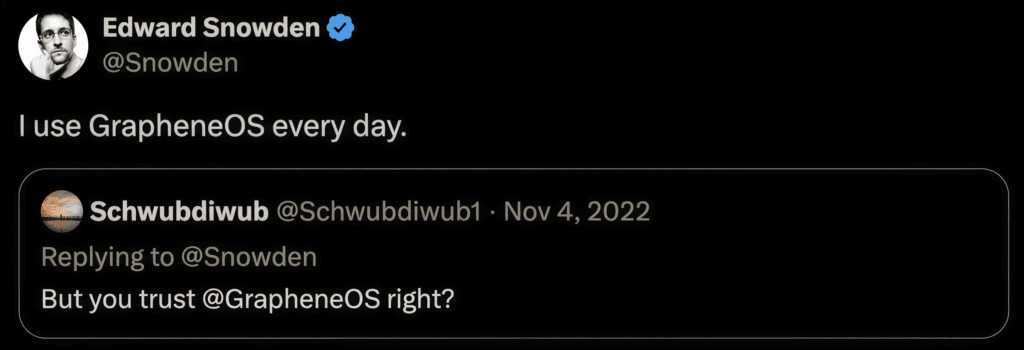
GrapheneOS positive review Edward Snowden
Normal phone vs Privacy Phone
FeatureNormal PhonePrivacy Phone
OS trackingBackground collectionNone by default
SensorsApp permissions + leaky systemOne-tap kill switches
AccountGoogle or Apple requiredNone required
Separate spacesLimitedUp to 32 profiles
Kids / teenFamily Link or Screen TimeA full profile you control
Emergency wipeBasic factory resetDuress PIN to wipe device
SetupYou do itWe do 4-7+ hours before it ships

See Essential or Pro Bundle for the two setup depths we offer.

A Privacy Phone stops a phone operating system treating your life as a product. Our level of configuration sets a higher standard in Australia, and it arrives ready.
Choosing a private phone australia 2026

-> Shop Privacy Phones

-> See all FAQs

best secure private anonymous phone privacypros australia

GrapheneOS is a privacy-focused Android-based operating system for Google Pixel phones. It is de-Googled: Google services and tracking are removed while everyday Android apps still work. We sell new Australian-stock Pixels with GrapheneOS professionally configured by hand, with a 2-year Australian warranty and Australian support.
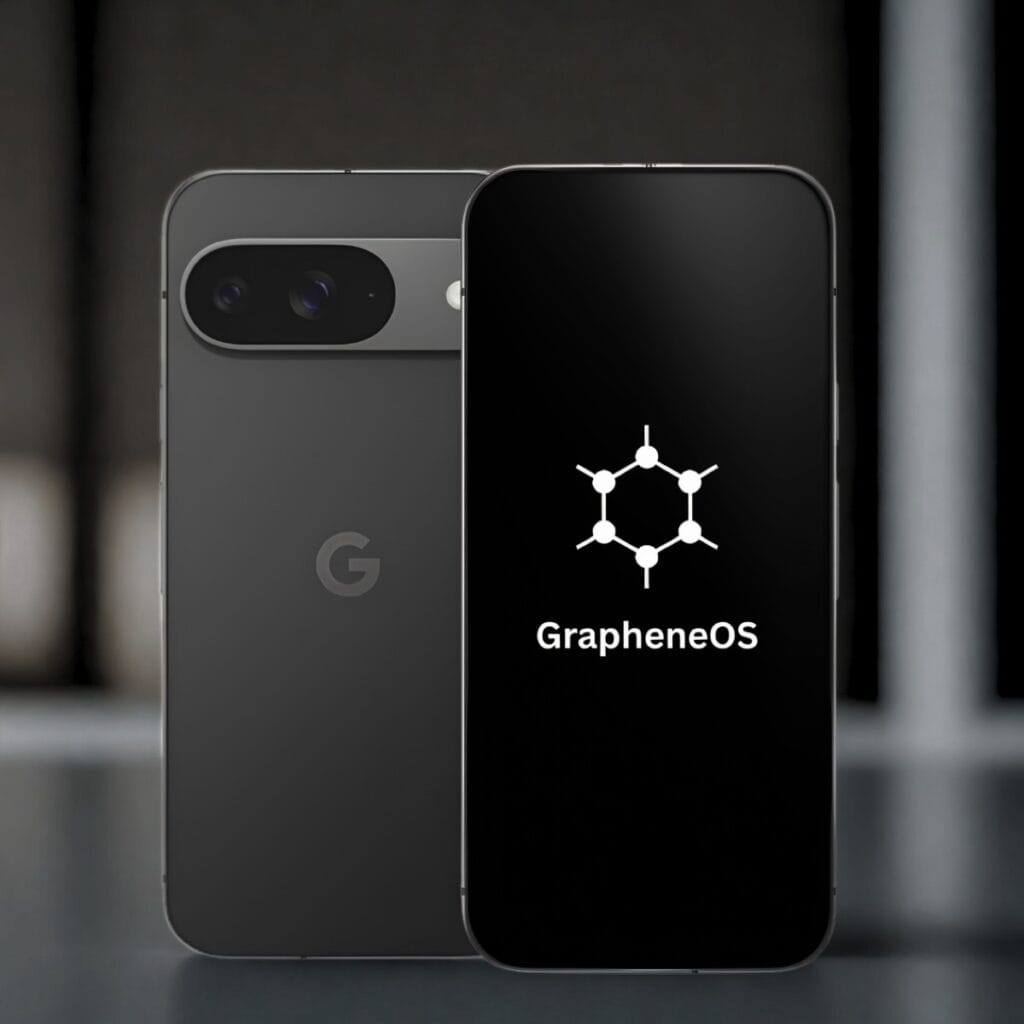
GrapheneOS phone australia privacypros

Is GrapheneOS legal in Australia?

Yes. GrapheneOS is free open-source software that you install and use on a phone you own. It works on Telstra, Optus and Vodafone networks in Australia, and you keep your existing number. No special permissions are required to use it on your device.

How does GrapheneOS compare to other de-Googled systems?

Privacy experts and organisations such as Proton align with GrapheneOS as the strongest de-Googled Android option for a Privacy Phone in 2026.

GrapheneOS review

Does GrapheneOS only run on a Pixel?

Officially, yes. Current support is for Google Pixel phones because they meet the required hardware and update standards. PrivacyPros sells new Australian-stock Pixel phones for this reason.

How a GrapheneOS Privacy Phone works

  1. You order a new Australian-stock Pixel Privacy Phone which includes a 2-year Australian warranty.
  2. We update the phone to the latest stock firmware.
  3. We unlock the bootloader, flash GrapheneOS, then relock the bootloader so Verified Boot stays on.
  4. We professionally configure it by hand to our standards for 4-7+ hours for privacy, security and usability.
  5. Australian support by a team of privacy advocates.

There is no flashing or technical setup required from you. The phone arrives ready to use. You insert your SIM or eSIM and start everyday use.

GrapheneOS key features in 2026

  • Everyday apps still work. Most Android apps run normally.
  • No Google or Apple account is required.
  • It works on Telstra, Optus and Vodafone. You keep your existing number.
  • One-tap controls: lock the camera, microphone, location, sensors and network when you want them off. See kill switches.
  • Per-app network and sensors permissions: simple toggles that can block network access or sensor data for individual apps. Sensor data includes how you move the phone, lifting it, orientation and similar motion signals. See isolation features.
  • Sandboxed Google Play: official Google Play that runs as a normal sandboxed app with no special system privileges. It is optional and only used in the profile that needs it.
  • Duress PIN: an entered code that irreversibly wipes the device (and eSIMs) if entered (for emergencies).
  • Auto-reboot: the phone restarts itself after a set locked period (default 18 hours) so data returns to an encrypted-at-rest state.
  • USB-C port control: blocks data connections at the hardware and software level while the phone is locked (default is charging-only when locked).

GrapheneOS is community-driven and does not profit from your data. For the latest GrapheneOS features, see official site list at grapheneos.org/features.

Who GrapheneOS suits

Our level of professional configuration ensures an easy transition from normal phones. Our configuration includes usability so everyday apps, calls, messages and banking work when the phone arrives. You get GrapheneOS control without the complexity.

GrapheneOS suits non-technical Australians, families and everyday users who want stronger privacy defaults without building or flashing a phone themselves.

It also suits professionals such as doctors, lawyers and journalists, plus travellers and people handling sensitive client or personal information who need tighter control over apps, sensors and location.

How does GrapheneOS compare to other de-Googled phones?

De-Googled only means Google services were removed the phone. The replacements are not equal.

GrapheneOS, CalyxOS, LineageOS and /e/OS all start from Android. They differ on security hardening, how they talk to Google, which phones they support, how fast patches land, etc.

GrapheneOS CalyxOSLineageOS/e/OS (Murena)
FocusSecurity-first hardeningPrivacy with app compatibilityCustom ROM, wide devicesBeginner-friendly de-Google
Google pathNone by default; optional sandboxed PlaymicroGCustomisable (potential leaks)microG
Device SupportGoogle Pixels onlyPixels + othersWide rangeFairphone and select devices
Usability for BeginnersSimple like stock AndroidEasy, some Google services optionalOften needs tweaks, buggyApp-focused, slow performance
UpdatesUp to 7+ years on current PixelsShorter, device-dependentVaries by maintainerDevice-dependent
Australian CompatibilityFull support (Telstra, Optus, Vodafone, etc) Good compatibilityUnevenLimited local support

We configure and ship GrapheneOS only. It is the strongest hardened de-Googled option for Australians. You get stronger defaults, everyday apps that work, and without the trade-offs of other systems.

-> Shop Privacy Phones

-> See all FAQs

-> Contact us

best secure private anonymous phone privacypros australia

We sell new Australian Pixels, de-Googled with GrapheneOS, configured before it ships. The privacy system and setup are the same across models. The model only changes the screen, camera, battery and whether it folds.

All phones come with a 2-year Australian warranty. We don’t sell refurbished or grey import phones. A used or grey-import “privacy phone” in Australia arrives with someone else’s hardware history, inherited risks, and a shorter warranty. See PrivacyPros vs other privacy phones.

Why we only sell Pixel phones

GrapheneOS needs a bootloader you can relock, Verified Boot, a Titan security chip, and years of firmware updates. Current Pixel 9 and Pixel 10 series have that. Samsung, iPhone, generic Android, and the Pixel 11 series do not. Until another device has official GrapheneOS support and meets the same bar, we stay on new Australian Pixel 9 and Pixel 10 phones.

Privacy Phone lineup (2026)

ModelSizes AvailableBest For
Pixel 10128GB, 256GBBest value entry to Pixel 10 series
Pixel 10 Pro128GB-1TBBalanced flagship
Pixel 10 Pro XL256GB-1TBLarge screen
Pixel 10 Pro Fold256GB-1TBCurrent-gen foldable
Pixel 9 Pro Fold256GB, 512GBValue foldable (phone + tablet)

Essential and Pro Bundle are the same phone with different depth of setup. See Essential or Pro Bundle.

Pick the body you will actually carry. All of these become private phones once configured.

-> Shop Privacy Phones

-> See all FAQs

best secure private anonymous phone privacypros australia

We sell two tiers of Privacy Phones: Essential and Pro Bundle. Both are the same phone – new Australian Pixel, de-Googled with GrapheneOS, configured before it ships. The difference is how far we set it up, how many profiles arrive ready, and what’s in the box.

Which Privacy Phone is for you?

  • Essential if you mainly want the operating-system leak closed. You are happy to live in one profile and add more later yourself. About 4+ hours of configuration.
  • Pro Bundle if you want daily use, work and high-privacy apps already separated on arrival. You also get a year of Proton Unlimited set up, a Faraday bag, and a support call. About 7+ hours of configuration.

Essential is not the insecure option. It is the same operating system with less of the setup done for you.

What’s the same on Essential and Pro

  • New Australian Pixel. 2-year AU warranty.
  • GrapheneOS configured with with kill switches, app sandboxing and optional sandboxed Google Play.
  • Four private app stores, Proton app ecosystem, and a vetted set of privacy apps.
  • Ready for Australian networks, both SIM and eSIM.
  • Quick Start Guide and full User Manual (extended with Pro Bundle).

Essential vs Pro Bundle

EssentialPro Bundle
Best forOne hardened profileSeparate rooms on day one
Setup4+ hours7+ hours
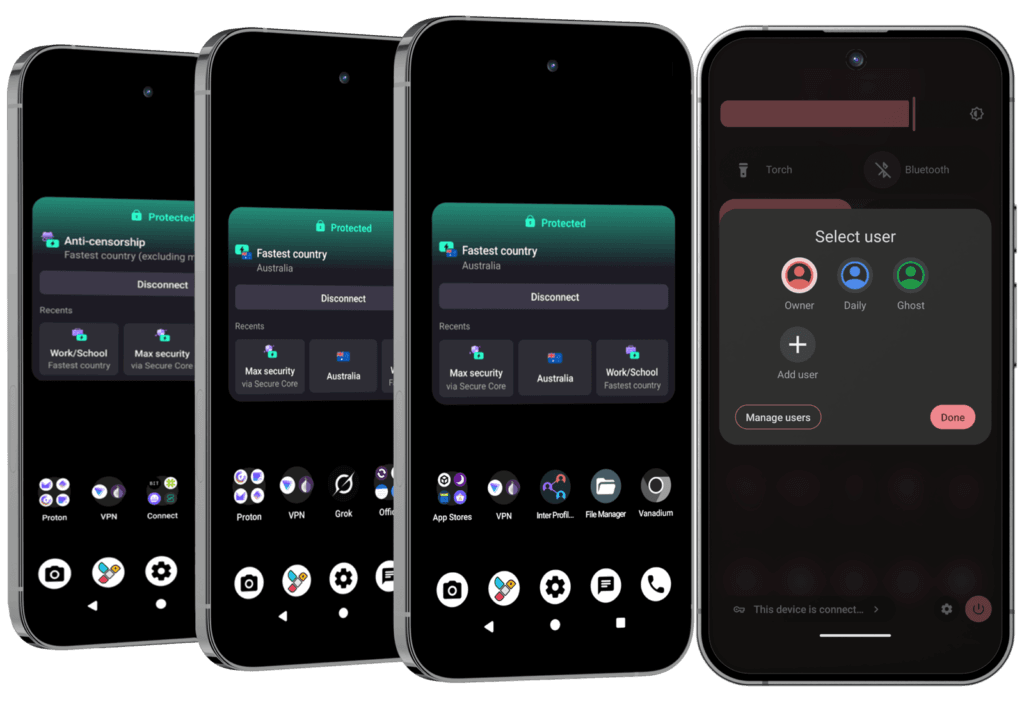
Profiles on arrivalOwner (you add more)Owner, Daily and Ghost (switch in seconds)
ProtonFree (you set up the account)1-year Unlimited (~$200) + account setup
In the boxPhone, cable, SIM tool, guidesSame + Faraday bag, camera covers, RFID/NFC blocker, mini notebook, 20-minute support call

You can add extra profiles or Private Spaces on Essential later. Pro Bundle is the version where those profiles are already built, documented and supported.

The three Pro Bundle profiles

GrapheneOS profiles are isolated rooms: separate apps, data and encryption keys. Switching takes seconds.

  • Owner (admin, red-themed): System controls and app installs. Push apps to other profiles. Smallest attack surface.
  • Daily (everyday use, blue-themed): The apps you actually live in (mail, messages, browser, maps, etc).
  • Ghost (extreme privacy tools, green-themed): Tracker and surveillance detection, anonymous messaging, hard-to-trace calls, unlimited email aliases, privacy-focused AI, censorship-resistant VPN, metadata stripping and off-grid tools

Essential and Pro homescreens (subject to change as our standards evolve):
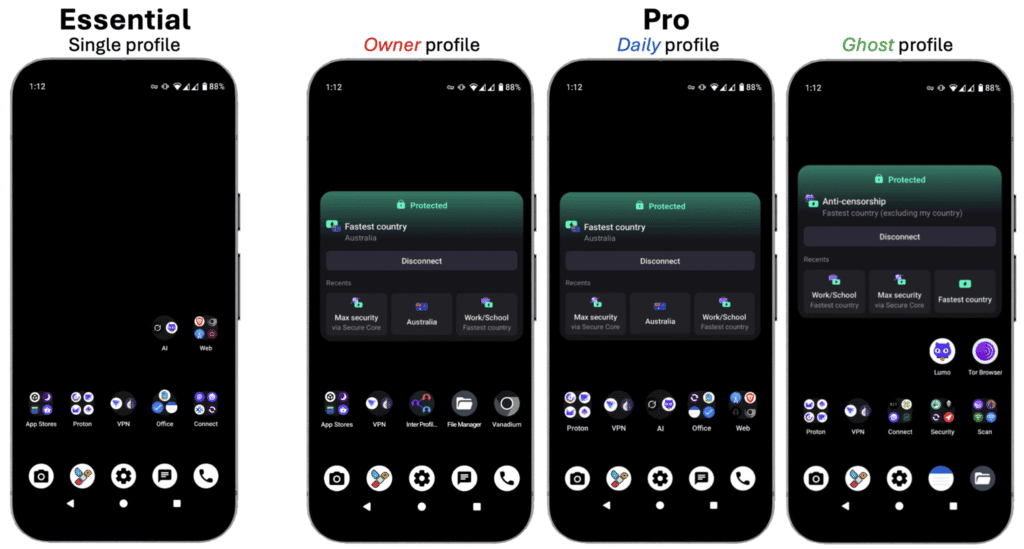
Privacy Phone profiles, Essential and Pro


Which one to buy

Choose Essential if the phone itself is the main leak you want closed, and you are comfortable adding profiles later with the User Manual.

Choose Pro Bundle if you handle sensitive work, you travel, or you want work and personal apps separated the day the phone arrives, with Proton Unlimited and the Faraday bag already in the box.

Most people who want separate profiles on day one choose Pro Bundle.

Common Questions

Can I upgrade from Essential to Pro later?

  • Not as a switch we can flip. The extra hours, the profiles, the Proton account and the accessories are part of the Pro build. Choose the tier when you buy.

Is the Proton Unlimited year forever?

  • No. Pro Bundle includes one year. After that you pay Proton if you want to keep Unlimited. We are a Proton Partner, so we can offer up to 38% off a renewal: https://go.getproton.me/SH30e.

What if I already have Proton Unlimited?

  • Contact us before you buy Pro Bundle. We issue a $200 coupon so you are not paying twice.

Can I add profiles on the Essential phone?

  • Yes. GrapheneOS allows up to 32, and Private Spaces. You do that yourself, with the User Manual. Pro Bundle is the tier where Owner, Daily and Ghost are already built.

-> Shop Privacy Phones

-> See all FAQs

best secure private anonymous phone privacypros australia

A Privacy Phone is a new Australian Pixel, de-Googled with GrapheneOS. The configuration standards are the 4-7+ hours of work by our Pros on top of that operating system, using a 100+ point checklist.

Our goal is to provide a private phone that sets a higher standard in Australia, with configuration focused on privacy, security, usability and resilience.

Anyone can flash GrapheneOS. The secure phone we sell is hours spent by our experts using a 100+ point checklist. Essential is about 4 hours. Pro Bundle is 7+ hours. See Essential or Pro Bundle. This checklist changes when GrapheneOS or the Australian threat model changes.

What the configuration hours cover

  • No Google telemetry from the operating system. The phone does not report home in the background.
  • One-tap kill switches for the camera, microphone, location, sensors and network, already in Quick Settings.
  • Wi-Fi and Bluetooth turn themselves off after 10 minutes of no use. The phone stops advertising itself to nearby networks.
  • 4G as the default. Calls still work on Australian networks. You can turn 5G back on. Smaller radio surface, and better battery.
  • Location off until you grant it per app. Camera, microphone and sensors off until an app asks. Nothing is listening or watching until you allow it.
  • USB stays charging-only when the phone is locked. A cable cannot pull data while the screen is locked.
  • Auto-reboot after 18 hours locked (you can change the window).
  • Independent app stores set up (GrapheneOS Apps, Accrescent, F-Droid, Aurora). Sandboxed Play is not switched on. You can install what you need without a Google account.
  • Proton apps pre-installed (Mail, VPN, Drive, Pass and the rest), plus private browsers, encrypted messaging and offline maps.
  • Proton account setup with privacy and security settings optimised (Pro Bundle).
  • Duress PIN available (leave it off until you have read the manual).
  • Quick Start Guide and full User Manual written for Australian networks and apps.

Essential vs Pro Bundle

Both use the same standards. Pro goes further: Owner, Daily and Ghost profiles already configured, Proton Unlimited account set up, Faraday bag and accessories in the box, and a 20-minute support call.

What the standards are not

A flash-and-ship phone is GrapheneOS in a box. Ours is the hours after that: new Australian Pixel stock, a two-year AU warranty, and a registered Australian company that still answers after it ships. How that compares is in PrivacyPros vs other privacy phones in Australia.

The standards close the device layer on a de-Googled GrapheneOS privacy phone. They are not the whole stack. Accounts, the browser, privacy-first habits, a Faraday bag if you need the phone dark, and off-grid communications sit on top.

-> Shop Privacy Phones

-> See all FAQs

PrivacyPros logo

Kill switches are one-tap tiles that turn off the camera, microphone, location, sensors, network, NFC or USB. They cut the path in the operating system. An app cannot flip it back on.

A permission screen is an app asking. A kill switch is the system refusing the hardware. Camera off means camera off, including to an app that already had permission.
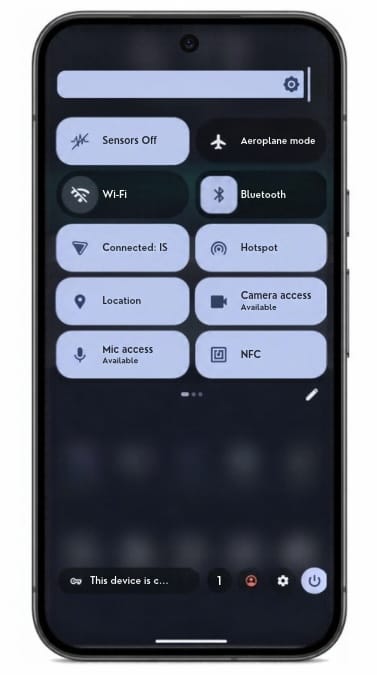
How kill switches work

  • Flip the tile. That hardware stays off until you turn it back on.
  • Use it in a meeting, at a security point, or when you want the phone quiet.
  • The ones you will use most sit in the quick-settings shade. One tap.
  • For a full radio blackout, put the phone in a Faraday bag. Pro Bundle includes one.

What you can turn off

  • Camera
  • Microphone
  • Location / GPS
  • Sensors (motion, gyro, accelerometer and the rest)
  • Network (Wi-Fi, mobile data, Bluetooth)
  • NFC
  • USB
Privacy Phone quick settings with camera, microphone and sensor switches off

Work and personal separation is profiles – a different control. See Isolation features.

The Faraday bag

The tiles quiet the phone from the inside. A Faraday bag blocks all the radios from the outside as well. Pro Bundle includes a Mission Darkness Faraday bag for phone.

Phone faraday australia

Common questions

Is a kill switch the same as a duress PIN?

  • No. Kill switches turn hardware off. A duress PIN wipes the device.

Can an app turn the camera back on?

  • Not while the tile is off. The switch is enforced by the system, not by an app you hope is telling the truth.

Do kill switches hide me from my carrier?

  • No. The network tile stops the phone using Wi-Fi and mobile data. It does not erase metadata the carrier already holds, and it does not hide a SIM that is still registered. The Faraday bag is the step when the radios themselves should be silent.

-> Shop Privacy Phones

-> Shop Faraday Bags

-> See all FAQs

best secure private anonymous phone privacypros australia

A Privacy Phone can run separate profiles. Each with its own apps, files, and encryption keys.

GrapheneOS treats these profiles as separate users, not folders. Work stays in one. Banking stays in another. A child’s profile can be limited and controlled. Everyday apps stay in their own room. You switch between them in seconds, with no reboot.

How isolation features work

  • Essential arrives with the Owner profile set up, and Private Space ready to use.
  • Pro Bundle arrives with three profiles already built: Owner, Daily and Ghost. You can add more, up to 32.
  • Storage Scopes and Contact Scopes limit what one app can see inside a profile.
  • On a normal phone, one compromised app or one shared gallery can see far more than it should. Separate profiles limit how far that reaches.

How these are laid out, and which tier to buy, is in Essential or Pro Bundle.

User Profiles

A profile is a complete separate user on the phone. It has its own apps, files, accounts and encryption keys. You can also control whether that profile can make calls or send texts, on the SIM or the eSIM. It is closer to carrying a second phone than to a work folder on a normal Android device.

  • On Essential, Owner is configured. You add Private Space, and extra profiles if you want them.
  • On Pro Bundle, three arrive ready:
    • Owner – the admin profile. Installs and updates are pushed from here.
    • Daily – the profile you live in, with everyday apps.
    • Ghost – high-sensitivity profile, kept apart, with extra tools for tracker detection and private comms.
Privacy Phone profiles, Essential and Pro

Private Space

A hidden room inside a profile, locked with its own PIN or fingerprint. Use it when you want one or two apps out of sight without creating a whole new profile. It has its own encryption. It still shares a few conveniences with the parent profile i.e. clipboard is. See it like a hidden drawer, not a second phone.

Scopes

Fine control over what one app can see inside a profile:

  • Storage Scopes – the app gets the folders you name, not the full gallery and downloads.
  • Contact Scopes – the app gets the contacts you pick, not the full address book.

The User Manual covers how to set these up.

Common questions about isolation features

Do I have to reboot to switch profiles?

  • No. Switch in seconds.

Does Private Space hide everything from the parent profile?

  • No. It has its own encryption and its own PIN. Some conveniences still pass through. The clipboard is the usual one. Hidden drawer, not a second phone.

Can I set up a profile for a child?

Separate profiles are one of the strongest practical advantages of this system. A compromised app or a messy profile stays contained.

-> Shop Privacy Phones

-> See all FAQs

best secure private anonymous phone privacypros australia

Yes. A Privacy Phone can give a child or teenager their own profile on a phone you control.

That profile has its own apps, its own PIN and its own encryption keys. You decide what is in it. While installs are switched off, they cannot add an app store and fill it themselves.

This is not a separate kids phone we sell, and it is not a monitoring service. It is a GrapheneOS feature the setup is built for. You keep Owner. They get a limited profile.

How a Privacy Phone works for kids and teenagers

  • Keep the Owner profile for yourself. Create a separate profile for the child or teenager.
  • Install only the apps you allow, and turn off new installs in their profile.
  • Restrict the SIM or eSIM if you want calls and texts switched off.
  • No Google or Apple account is required. You keep the master PIN.

A stock family phone usually comes with a Google or Apple ID in the child’s name, and an app store already open. This layout removes both.

What Australian law covers for children’s privacy

From 10 December 2025, age-restricted platforms in Australia must take reasonable steps to stop under-16s holding accounts. That removed a lot of Instagram, Snapchat, TikTok and YouTube logins. It did not remove the Google or Apple account created the day a normal phone came out of the box. It did not stop a browser opening the same sites without logging in.

From 10 December 2026, the OAIC must register a Children’s Online Privacy Code. The dates are in Australia’s Privacy Law Changes. Neither rule removes tracking from stock Android or iOS.

Why Family Link is not a privacy fix

Family Link and Screen Time need a platform account on the child. You see more, but the company does too.

A Privacy Phone works the other way. You decide what exists in the profile. You do not get a live feed of their chats. Google does not get a childhood file from the operating system. An app you then allow can still collect what you permit it to collect.

Screen time, sleep and the habit itself are a separate problem. That guide is Device Addiction with Kids.

How profiles work for a child or teenager

A profile is a real user. Its own apps, files, keys and PIN. An app in one profile cannot read another. You switch in seconds. See Isolation features.

Owner is yours. It takes updates and pushes apps into the profiles you manage. After a restart, Owner unlocks first, then they switch. Give them their own PIN. Keep Owner’s PIN as the master key.

When you add the profile you can block new installs and restrict calls and texts. If TikTok is not installed, it is not in that profile.

Private Space is a hidden drawer inside a profile. It is the wrong tool for a child. Use a full extra profile.

Optional Private DNS in Owner, such as Cloudflare for Families or NextDNS, blocks many adult and phishing domains. It is a layer, not a wall. A browser can still reach what DNS does not catch.

Essential or Pro for a kids Privacy Phone

Essential arrives with Owner ready. You add their profile with the User Manual.

Pro Bundle arrives with Owner, Daily and Ghost already built. Their room is best created as a fourth profile. The 20-minute support call can cover the layout once. A longer walkthrough is a consultation. See Essential or Pro Bundle.
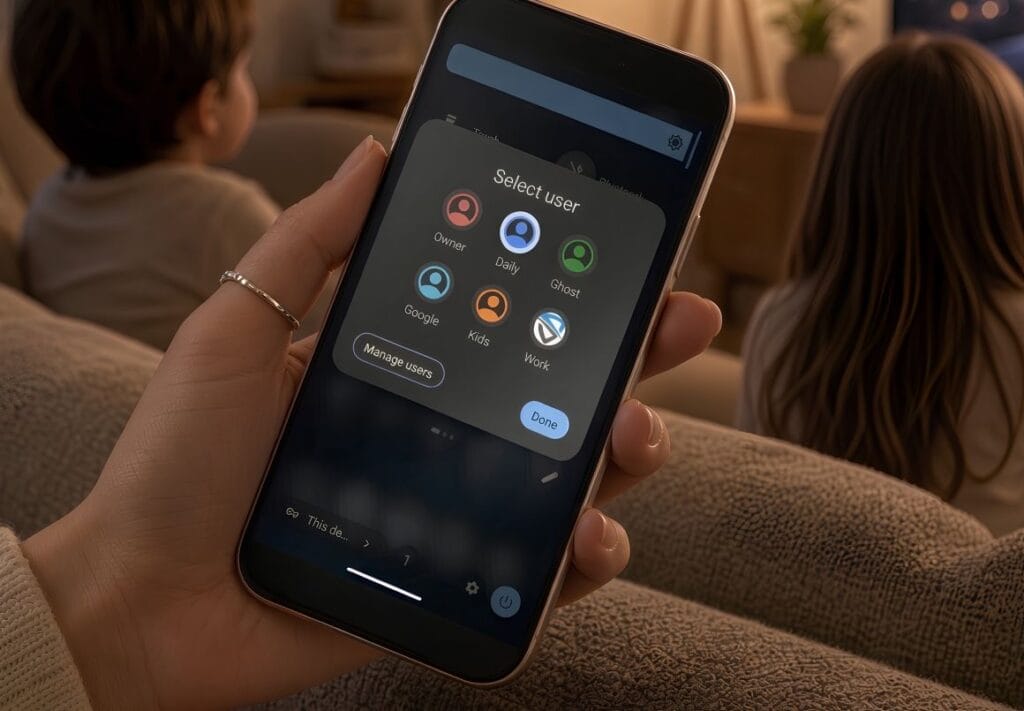
privacy phone for kids teenagers in Australia 2026

What a Privacy Phone will not do for kids

  • It will not show you their messages or photos from inside their profile. Isolation works both ways.
  • It will not replace a basic handset with no internet, for a young child who only needs to call home. This layout is for a child or teenager who needs maps, messages or a browser.

Common questions about Privacy Phones for kids and teenagers

Will you set up the child’s profile before the phone ships?

  • Not as a set option. The manual has the steps. The Pro Bundle support call, or a consult, can walk you through it so you keep control afterwards.

Can a child open Instagram in the browser?

  • If the site loads, yes. Take the app off. Decide whether a browser stays in that room at all. That is the control.

What about a school app that needs Google?

  • Sandboxed Play in their room only. Do not put a Google login in Owner.

Does Australian law require a Privacy Phone for kids?

  • No. The Privacy Act (1988) and the children’s code govern organisations. They do not strip tracking from a stock phone.

Start with a configured Privacy Phone. Keep Owner. Give them a limited profile, and control what’s in it.

-> Shop Privacy Phones

-> See all FAQs

best secure private anonymous phone privacypros australia

Every Privacy Phone arrives with four app stores already set up. You can browse and install without a Google or Apple account.

Pick a store. Install what you need. The phone still feels like Android.

How to install apps on a Privacy Phone

  • Install from GrapheneOS Apps, Accrescent, F-Droid or Aurora.
  • Most Android apps run on GrapheneOS.
  • If a bank or a government app asks for Google Play, turn on sandboxed Play in that profile. The User Manual walks through it.
  • Use the stores first. A random APK file is the last resort.
  • A normal phone puts a Google or Apple login at the door of every install. This one does not.

The four app stores on a Privacy Phone

  1. GrapheneOS Apps is the project’s own store. The camera, Vanadium, and the other first-party tools, signed by GrapheneOS.
  2. Accrescent is a small, high-trust store for this system. Apps are checked against pinned signing keys. The catalogue is shorter on purpose.
  3. F-Droid is free and open-source apps. Listings note trackers, so you can see them before you install.
  4. Aurora Store is the Google Play catalogue without signing in with your own Google account. Use it when the app only lives on Play. A paid purchase still needs a Google account for that transaction.

Common questions about installing apps

Will the apps I need work on a Privacy Phone?

  • For most people, yes. Major Australian banks generally run once sandboxed Play is on in the profile that needs them. We leave Play off at dispatch, so the default stays private. You add it only if a specific app asks.
  • Sandboxed Play is an ordinary app. It is isolated from the rest of the system. It does not get the system access Play Services has on a stock Android phone. See details in De-Googled Phones Australia: Switching in 2026.

Do I need a Google or Apple account to install apps?

  • No. The four stores work without one. The exception is a paid Play purchase through Aurora. That transaction needs a Google account.

Can I install an APK file directly on GrapheneOS?

  • GrapheneOS allows it. Prefer a store with signed apps when you can. The User Manual covers the safer path, and when a website is enough without an app at all.

What about Maps, YouTube or my bank apps?

  • Most banks work with sandboxed Play. Maps and video already have private alternatives on the phone. See apps that come pre-installed. You can add the official apps from Aurora or sandboxed Play if you choose to.

What about the September 2026 Android install rule?

  • From 30 September 2026, certified Android phones in four countries only install apps from registered developers, with a wider rollout planned for 2027. A GrapheneOS phone is not a certified Play device, so it does not enforce that rule. The stores above keep working.

-> Shop Privacy Phones

-> See all FAQs

best secure private anonymous phone privacypros australia

Every Privacy Phone arrives with a vetted set of apps installed and ready. You are not assembling a privacy stack from scratch.

How pre-installed apps work on a Privacy Phone

  • Essential and Pro share the same foundation: private browsers, Proton, encrypted messaging, maps, notes and the day-to-day tools.
  • No Google or Apple account is required to use them.
  • Pro Bundle adds a year of Proton Unlimited with the account set up, three profiles ready, and extra tools in the Ghost profile.
  • Sandboxed Google Play is available. It is not switched on at dispatch. How to add an app is in install apps on a Privacy Phone.

A stock phone arrives already tied to a platform account and a store that profiles you. This set works on day one without that.
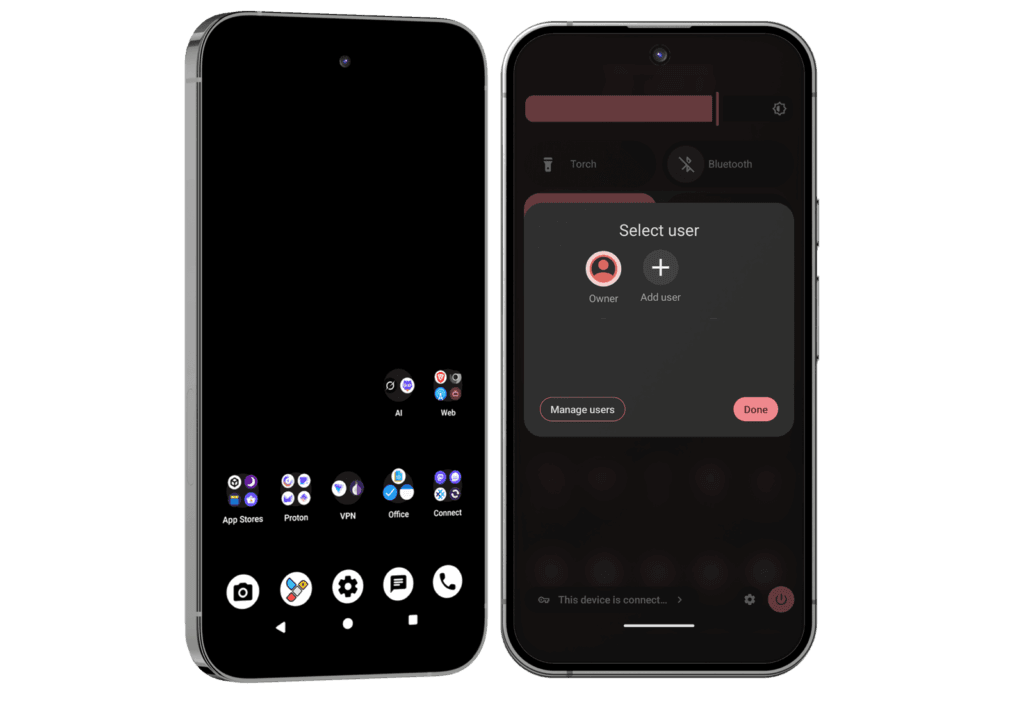
Apps on every Privacy Phone (Essential and Pro)

  • Browsing: Vanadium (GrapheneOS’s hardened browser), plus Brave and Tor Browser. Private ways to play podcasts, music and video offline.
  • Proton Free: Mail, Drive, Calendar, VPN on one device, Pass and Authenticator. You create the account. Swiss-hosted.
  • Day to day. Documents, encrypted notes, encrypted calls and messages, offline maps and weather, and a tool to strip location data from photos before you share them. A private assistant that does not keep your prompts.
anonymous privacy private phone Australia user profiles essential

Extra apps on the Pro Bundle

Everything above, plus:

  • Proton Unlimited for 12 months. About $200 at current Proton pricing: 500 GB of Drive, VPN on up to 10 devices, more addresses, Pass vaults, Sentinel and dark-web alerts. After the year you renew with Proton. Already paying for Unlimited? Contact us before purchase for a $200 discount coupon so you are not paying twice.
  • Three profiles ready: Owner, Daily and Ghost. You can add more, up to 32. How those rooms work is in isolation features. Which tier to buy is in Essential or Pro.
  • Ghost profile tools: Tracker detection (bluetooth and network scanners), rogue hotspot identification, secure peer-to-peer communication tools, location spoofing, Proton + Tor/Orbot hybrid VPN configurations, secure document shares, and the extra notes in the Pro manual.
anonymous privacy private phone Australia user profiles pro bundle

Why these apps are pre-installed

Unlike others, we provide a complete, ready-to-use privacy-first ecosystem. Our detailed User Manuals include an overview of each app, Pro-tips, video links, alternatives, etc.

This approach helps you avoid a steep learning curve while maximising privacy from day one.

-> Shop Privacy Phones

-> See all FAQs

-> How to Protect Your Privacy in Australia

best secure private anonymous phone privacypros australia

Yes. The Proton app set is on every Privacy Phone.

Mail, VPN, Drive, Calendar, Pass, Authenticator, Wallet, Meet and Lumo are installed on Essential and on Pro Bundle. The difference is the plan. On Pro Bundle we also set the account up.

We are a Proton Partner. The apps are Swiss-hosted. Mail and Drive are end-to-end encrypted. The VPN is no-logs. They sit inside GrapheneOS’s sandbox, so they do not get a free look at the rest of the phone.
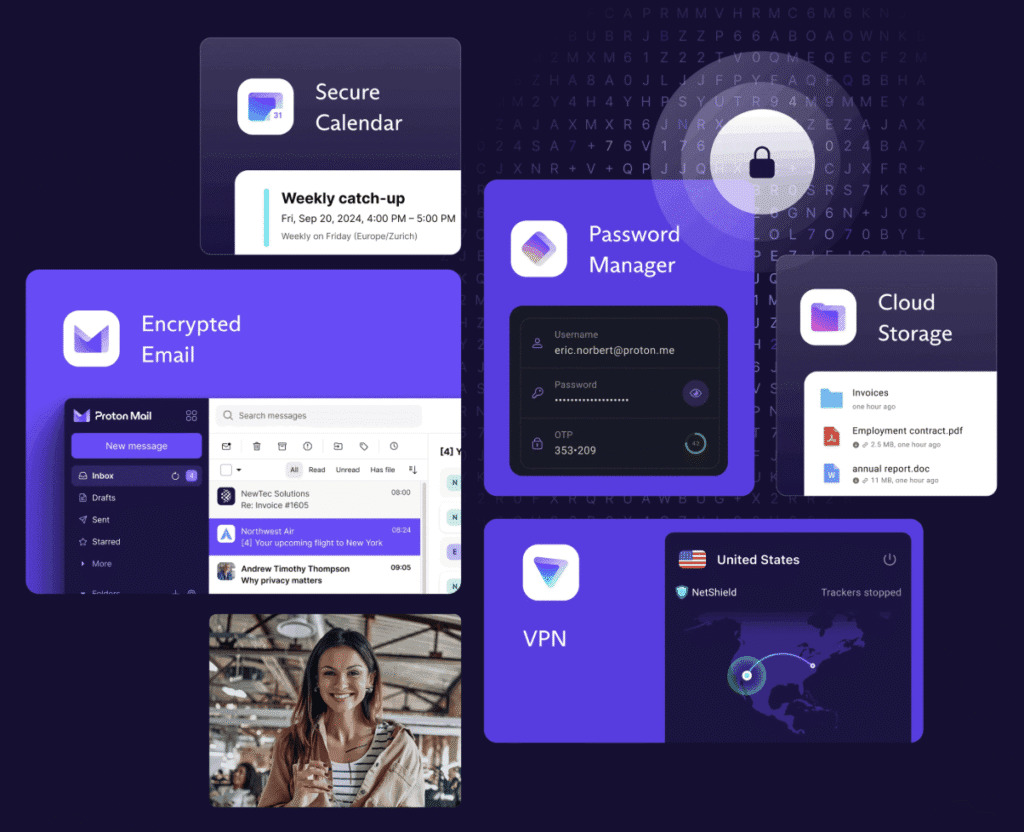
How Proton apps work on a Privacy Phone

  • Same apps on both tiers.
  • Essential runs Proton Free. You create the account. Looking to upgrade? As a Proton Partner we can offer up to 38% off: https://go.getproton.me/SH30e.
  • Pro Bundle includes 12 months of Proton Unlimited, about $200 at current pricing, and we complete the account setup before it ships.
  • Already paying for Unlimited? Contact us before you order. We send a $200 coupon so you are not paying twice.
  • Gmail, Outlook and a consumer VPN keep the account inside the same companies that already profile the phone. Proton is the account layer we put on GrapheneOS instead.

What Proton apps are on the phone

  • Mail: Encrypted email instead of Gmail or Outlook.
  • VPN: Routes the connection through Proton’s no-logs network. Hides your IP from the sites you visit.
  • Drive: Encrypted files and photos, with sharing links when you need them.
  • Calendar: Private calendar on the same login as Mail.
  • Pass: Password manager with aliases and a built-in 2FA option.
  • Authenticator: Standalone codes for accounts that need an extra step.
  • Wallet: Self-custodial Bitcoin wallet in the Proton account.
  • Meet: Encrypted video calls without a Google or Zoom account.
  • Lumo: Proton’s private AI for drafts and questions, no login / account needed.
proton vpn mail drive australia

Essential

Proton Free. One Mail address, up to 1 GB and 150 messages a day. Drive up to 5 GB. VPN on one device. Calendar, Pass, Wallet, Meet and Lumo on their free tiers. No ads. You create the account after the phone arrives. The User Manual has the steps.

We are a Proton Partner, and offer up to 38% off: https://go.getproton.me/SH30e.

Pro Bundle

The same apps, on Unlimited for 12 months (~$200 value), account ready:

  • 500 GB shared Mail + Drive
  • 15 Mail addresses, unlimited aliases and 3 custom domains
  • VPN on 10 devices, full server list (including Australia), Secure Core, Tor-over-VPN, split tunnelling, NetShield, streaming
  • Proton Sentinel and dark-web monitoring
  • Pass vaults, Authenticator, Wallet extras and priority support
  • Lumo on the plan’s included AI tier.

See the Proton website for full specs.

After the year you renew with Proton, or step down to Free. The apps stay on the phone either way.

Which tier to buy is in Essential or Pro.

One Swiss login covers mail, files, calendar, passwords, VPN and a private assistant. That is the account layer we want on GrapheneOS. Essential is the working free set. Pro Bundle is the same set with the paid room, and the account already done.

-> Shop Privacy Phones

-> See all FAQs

best secure private anonymous phone privacypros australia

Yes. Every Privacy Phone ships with three privacy-focused browsers, ready to use.

How the secure browsers work on a Privacy Phone

  • Vanadium is GrapheneOS’s hardened daily browser. No Google telemetry. It updates with the system.
  • Brave blocks ads and trackers, and can sync bookmarks to a computer and other devices.
  • Tor Browser sends the session through the Tor network when you want that extra hop. It is slower. Some sites block it. It is not the all-day browser.
  • Chrome is not installed. A normal phone opens Chrome or Safari already tied to an account. These three keep that out of the default path.

The three browsers on a Privacy Phone

  • Vanadium is the one to live in. It is based on Chromium, with site isolation, a strong sandbox, and memory protections on supported Pixels. It does not send your browsing to Google. Security updates arrive with GrapheneOS.
  • Brave is the one with built-in ad and tracker blocking, and encrypted sync if you want the same bookmarks on a computer. The User Manual has the steps and a sync guide for your PC and other devices. It also has a Tor window for a tighter session, without opening a separate app.
  • Tor Browser is the one for a session you do not want tied to your normal browsing. Traffic goes through the Tor network. Use it when that matters more than speed. Do not use it for the bank.

Common questions about the secure browsers

If I log into Gmail or Facebook, am I still private?

  • The browser leaks less. The account still knows it is you. That is the account layer. Proton Mail instead of Gmail. A private browser instead of a logged-in Chrome profile. See Proton apps on Privacy Phones.

Can I install Chrome on a Privacy Phone?

Does a private browser hide me from my carrier?

  • No. It cuts what the tab sends. It does not hide a SIM, and it does not replace GrapheneOS. Use Vanadium or Brave for the day. Reach for Tor when the session needs the extra hop.

-> Shop Privacy Phones

-> See all FAQs

best secure private anonymous phone privacypros australia

Yes. Insert a nano-SIM, or add an eSIM. The phone an unlocked, new Australian-model phone.

How a Privacy Phone works with SIM, network and travel

  • Telstra, Optus, Vodafone and the networks that resell them work, including Boost, Amaysim, Kogan Mobile and ALDI Mobile.
  • You keep your number. Port it the usual way, or move the SIM across.
  • Every model has one nano-SIM tray and one eSIM. Use the split for work and personal, or for a travel line.
  • We ship in 4G mode. Turn 5G on in Settings if you want it. Calls still work either way.
  • Take it overseas on 4G in most countries. A local prepaid SIM or eSIM works in the usual way.

SIM and eSIM on a Privacy Phone

Add an eSIM from the carrier’s QR code in Settings. Some carrier apps want sandboxed Play. The User Manual covers both paths. How to add that is in install apps on a Privacy Phone.

You can put the two lines in different profiles if you want them further apart. That is in isolation features.

Using a Privacy Phone for travel

Take the same phone. Proton VPN is already on it if you want an Australian-looking connection for banking or mail while you are away. See Proton apps.

A handful of countries use bands an Australian Pixel does not tune, including some US millimetre-wave. Voice and data still run on 4G in almost every case. If you live on one overseas network, contact us before you order.

Why 4G is the default

Our standards set the radio to 4G. It is a smaller radio surface, the battery lasts longer, and the networks you use in Australia still carry the call. Toggle 5G when you want the extra speed.

Android Auto on a Privacy Phone

Install Android Auto from sandboxed Play. The User Manual has the steps. Wired or wireless, depending on the car. Maps, calls and media. If a head unit is fussy, turn on the compatibility option in Settings.

Common questions about SIM, network and travel

Will my number move across to a Privacy Phone?

  • Yes. Port it, or move the physical SIM. eSIM moves by the carrier’s transfer, not by popping a tray.

Do I need a Google account to activate the SIM?

  • No.

Does 4G mean I cannot use 5G?

  • No. It is the default. You can turn 5G on.

Will a Privacy Phone work on a ferry or a regional tower?

  • It uses the same cellular hardware as a stock Pixel. Coverage is the tower, not the operating system.

-> Shop Privacy Phones

-> See all FAQs

best secure private anonymous phone privacypros australia

Yes. You can see nearby Bluetooth tags, look at an odd Wi-Fi network, and cut Bluetooth or Wi-Fi in one tap.

AirTags, Tiles and similar tags talk over Bluetooth at a short range. A look-alike hotspot can try to catch a connection. The phone will not jam those radios. It will show them to you, and it will let you go quiet.

How a Privacy Phone handles BLE and Wi-Fi trackers

  • Every Privacy Phone randomises the Wi-Fi and Bluetooth address, and turns those radios off after 10 minutes with no connection.
  • One tap cuts Bluetooth, Wi-Fi, sensors, and more. See kill switches.
  • Pro Bundle adds tracker scanning and alerts in the Ghost profile.
  • Put the phone in a Faraday bag when you want the radios blocked from the outside. Pro Bundle includes one.

Tracker protection on every Privacy Phone

A new address on each Wi-Fi and Bluetooth connection, so the phone is harder to follow from network to network. Wi-Fi and Bluetooth switch themselves off after 10 minutes with nothing connected. The tiles for Bluetooth, Wi-Fi, NFC and USB sit in the quick settings.

Tracker scanning on the Pro Bundle

The pre-configured Ghost profile arrives with the scanning tools. A Bluetooth scan looks for AirTags, Tiles and Find My devices nearby, alerts you, and can play a sound to help you find the tag. You can set a zone, such as home or the car, and be told when a tag enters or leaves it. A Wi-Fi scan shows hidden network names, signal strength, and a hotspot that does not look like the one you expected.

The Faraday bag in the box blocks the radios from the outside while it is sealed. Test it: phone on, bag sealed, call it. If it rings, the bag failed. See How Faraday Bags Boost Privacy and Security.

What tracker detection will not do

It will not jam a tag. It will not hide the handset from your carrier while the SIM is on. It will not replace looking in the bag, the car and the jacket. A tag in a car’s wheel arch is a physical search, not an app.

Common questions about BLE and Wi-Fi trackers

Will a Privacy Phone find an AirTag in my bag?

  • It can alert you that a tag is travelling with you, and help you make it beep. You still have to find the tag.

Does the Essential phone have the tracker scanner?

  • Essential has the radio switches and the randomised addresses. The scanning tools and the Faraday bag are on Pro Bundle. See Essential or Pro.

Does turning Bluetooth off stop all tracking?

  • It stops this phone talking to a nearby tag or hotspot. It does not stop a tag that is talking to other people’s phones, Wi-Fi beacons, and hiding a SIM.

Modern tracking devices and rogue networks are increasingly used for surveillance. Privacy Phones paired with Faraday bags gives practical, easy-to-use tools to detect, block, and respond to these tracking threats – without needing technical expertise.

If you know… you know.
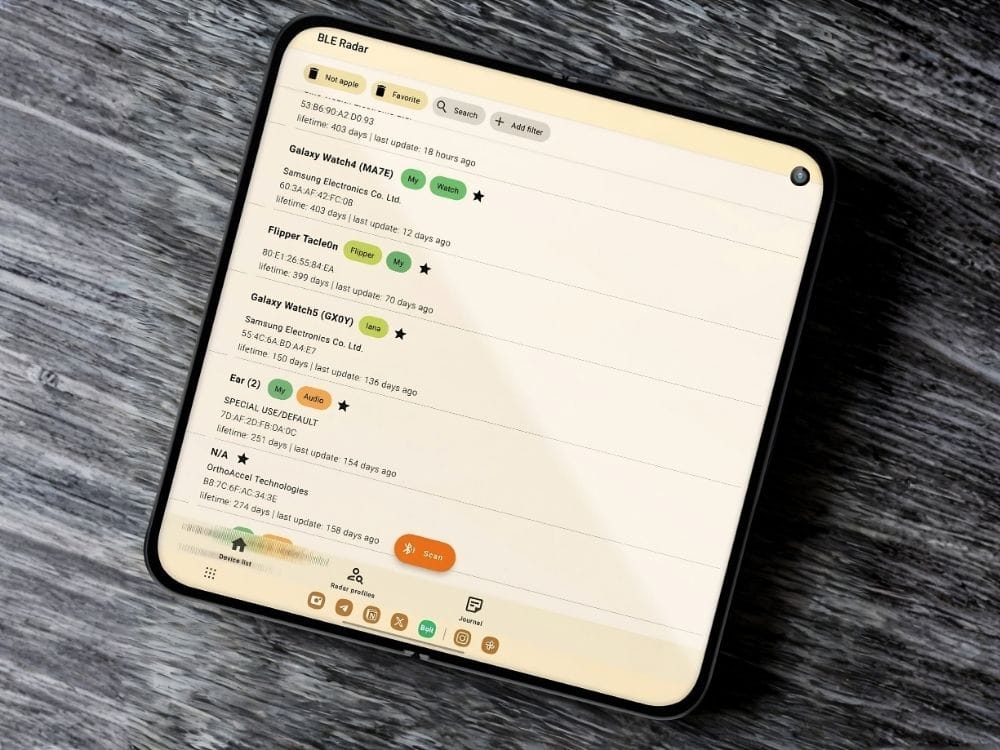
Pixel 9 Pro Fold privacy phone unfolded showing both inner screens

-> Shop Privacy Phones

-> Shop Faraday bags

-> See all FAQs

best secure private anonymous phone privacypros australia

Not while the phone is on the mobile network. Carrier tracking on a privacy phone in Australia continues while the SIM is active: the network still sees the handset identity and which tower it is using.

Telstra, Optus, Vodafone and the networks that resell them see the handset through the SIM. They see the IMEI (the unique handset identity) and which tower you are on, and they keep call and message records. In a city that location is often tens of metres. In the bush it’s much wider. Australian law requires them to keep specified metadata for at least two years. GrapheneOS does not write that away.

What a Privacy Phone changes about mobile tracking

  • GrapheneOS does not require a Google or Apple account.
  • The operating system no longer reports home to Google or Apple.
  • Carrier apps are not pre-installed.
  • You can control network, sensor and location access per app.
  • Profiles let you separate work, family or sensitive use.
  • A GrapheneOS privacy phone does not stop network-level carrier tracking.

What Telstra, Optus and Vodafone still see

While the mobile radio is on with a SIM, the carrier sees the registered service, the handset identity (IMEI) and the cell tower the phone is using. GrapheneOS cannot hide these from the carrier. The same applies to networks that resell Telstra, Optus or Vodafone.

Tools that limit mobile network tracking

ToolWhat it does
Airplane ModeRadios off. Turn Wi-Fi back on for data if you want.
LTE-Only (4G) Mode4G/VoLTE for calls. Smaller radio surface than 5G.
Network tileApps lose the internet until you allow it (kill switches)
Proton VPNHides your IP from the sites you visit.
MAC RandomisationNew Wi-Fi and Bluetooth names each connection.
Tracker ToolsPro Bundle tools for detection of trackers (tracking)
Faraday bagNo radio in or out while sealed. Included with Pro Bundle.

How people actually use this

  • At home on Wi-Fi and VoIP when they do not need a mobile number.
  • On the road with a normal number for calls, SMS and banking.
  • In silence with airplane mode or a sealed Faraday bag when they want no network contact.
  • For messages without towers, using Off-Grid devices (no SIM, no towers, no tracking).

Common questions about mobile network tracking

Does a VPN hide me from Telstra?

  • No. It hides your IP from the website. The carrier still sees that the handset is on their network, and still keeps the metadata the law requires.

What is metadata retention in Australia?

  • Carriers and relevant providers must keep specified telecommunications metadata for at least two years under the Telecommunications (Interception and Access) Act 1979. This includes subscriber and device identifiers, source, destination, date, time, duration, type of service, and location of equipment (such as cell towers). It does not require retention of message content or full internet browsing history.

Can police track my phone in Australia?

  • Agencies can lawfully seek telecommunications data under the TIA Act with the required authorisations. This is not the same as a consumer “track my phone” button. The data that can be requested includes the metadata carriers are required to retain.

Does airplane mode stop carrier metadata?

  • Airplane mode stops new cellular contact while the radio is off. It does not erase metadata the carrier already holds.

What about IMEI tracking?

  • The IMEI identifies the handset to the network. While the phone is connected, the carrier already sees the IMEI. IMEI blocking (used for lost or stolen phones) stops the handset working on Australian networks; it does not locate the phone.

Does a Faraday bag stop phone tracking?

  • A sealed Faraday bag blocks radio in and out, including cellular, and typically Wi-Fi, Bluetooth and GPS reception while sealed. It does not delete past carrier records.

Is off-grid a phone number?

  • No. Off-grid mesh devices send messages between radios without a SIM or towers. They are not a phone number.

A GrapheneOS privacy phone reduces the tracking that happens on the device itself. When you need no SIM and no towers, consider off-grid private communications.

-> Shop Privacy Phones

-> Shop Off-Grid

-> Shop Faraday Bags

-> See all FAQs

best secure private anonymous phone privacypros australia

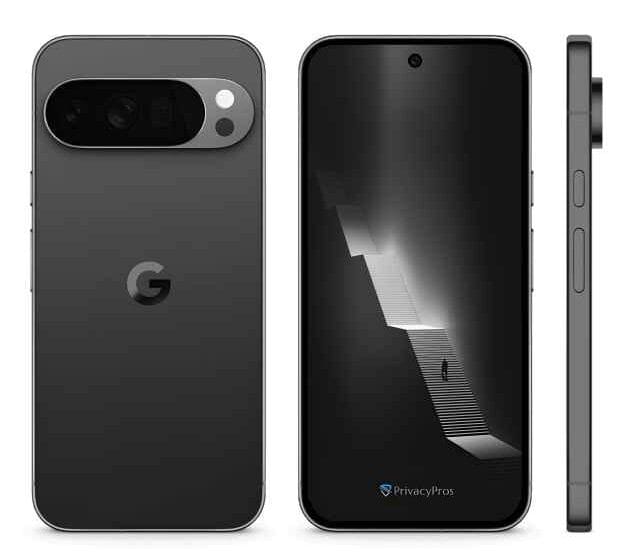
The same as the Pixel you bought. We sell new Australian Pixels. The sensors, the lenses and the OLED screen are the hardware Google shipped. GrapheneOS does not swap those for weaker parts.

It does change the default camera app. It does not need a Google account, or a cloud upload, to take a picture.

How the camera and display work on a Privacy Phone

  • Photo quality matches a stock Pixel when you use the same app.
  • GrapheneOS Camera is the private default. HDR, night mode, and a way to strip location from the photo before you share it.
  • Install Pixel Camera only if you want Google’s heavier processing and the extra modes.
  • The screen is the same panel. Brightness, colour and smoothness are the phone you bought.
  • Camera and screen claims assume a new sensor and a new panel. We do not sell refurbished or grey-import Pixels. See what phones we sell.

The camera on a Privacy Phone

GrapheneOS Camera can run without a Google account. You can deny it the network. Cloud extras, the heavy editing tools and backup to Google Photos, need a Google account if you want them. They are optional. Leave them off.

You still have the camera kill switch. One tap and the camera is off, including to an app that already had permission. See kill switches.

The display on a Privacy Phone

The same OLED panel as that Pixel on stock Android. GrapheneOS does not dim the hardware.
Common questions about the camera and display

Do I have to install Pixel Camera?

  • No. Plenty of people never do. Install it only if you want the extra processing.

Can the camera upload my photos?

  • GrapheneOS Camera does not need the cloud. Pixel Camera will not upload if you deny it the network and you skip Google Photos. Check the permission.

Is a refurbished screen the same?

privacy phone australia 10 Pro 1

The camera is still a Pixel camera. GrapheneOS stops the OS harvesting your data in the background. The photo is yours unless you send it somewhere.

-> Shop Privacy Phones

-> See all FAQs

best secure private anonymous phone privacypros australia

A Privacy Phone and a jailbroken or rooted phone both promise more control. They get there by opposite means.

A PrivacyPros phone is a new Australian Pixel running GrapheneOS, with the bootloader relocked. Google’s tracking layer is gone. Verified Boot, the sandbox and the updates stay on.

Jailbreaking an iPhone, or rooting Android, punches through that lock so you can change anything. Malware can change it too.

How a Privacy Phone differs from a jailbroken or rooted phone

  • Root and jailbreak trade the factory security model for deep customisation.
  • A GrapheneOS Privacy Phone keeps that model and still removes stock tracking.
  • You do not need root for the sensor switches, the profiles, or the private app stores.
  • Australian Banks often refuse a rooted phone. Most banks run on ours with sandboxed Play.
  • We do not support rooting a phone we sold. It undoes the model we shipped.

Privacy Phone vs jailbroken or rooted phone

Privacy PhonesJailbroken iPhones / Rooted Android
PrivacyStock OS tracking removed; strong togglesSome tracking can be cut; new leaks are common
Security modelVerified Boot relocked; sandbox and updates stayCore protections bypassed
StabilityNormal Android day-to-dayOften unstable. Breaks are common
Ease of UseFeels like a normal Android after professional setup.More technical and requires ongoing maintenance.
UpdatesUp to 7 years on supported PixelsOften lost after an OS update
Risk LevelLow. Designed with security as a core feature.High. Increased exposure to malware and instability.
MaintenanceLow after setupRe-root / re-jailbreak
AppsMost work; sandboxed Play if neededSome banks and apps refuse rooted devices
Best forPrivacy without living in a workshopAdvanced users who accept the risk for customisation

Common questions about jailbreaking and rooting

Is GrapheneOS rooted?

  • No. It is a replacement operating system with Verified Boot relocked. That is the opposite of root. See what is GrapheneOS.

Can I root a PrivacyPros phone later?

  • We do not support that. It would undo the bootloader lock and the checks we shipped.

Will my bank app work on a Privacy Phone?

  • Most major Australian banks work with sandboxed Play in the profile that needs them. Many banks block a rooted device. See De-Googled Phones in Australia.

Do I need to be technical to use a Privacy Phone?

  • No. We do the configuration. A jailbreak is the path that needs a workshop.

Jailbreak and root trade the lock for control. A Privacy Phone keeps the lock, and still takes Google out of the operating system.

-> Shop Privacy Phones

-> See all FAQs

best secure private anonymous phone privacypros australia

Not every privacy phone in Australia is the same product.

A Pixel de-Googled with GrapheneOS is the right base. What you buy from a seller is the hardware history, the hours of configuration, the warranty path, and whether anyone in Australia still answers after it ships.

In Australia 2026, results mix four offers:

  1. a DIY flash guide
  2. a seller who installs GrapheneOS and posts the box
  3. a refurbished or grey-import unit with a privacy system on it
  4. a professionally configured new Australian Pixel, with support around it.

Quick answer: PrivacyPros vs other privacy phones

  • PrivacyPros is the last of those four. New Australian Pixel stock, GrapheneOS, 4-7+ hours to standards on a 100+ point checklist, a two-year manufacturer warranty, and Australian manuals.
  • Pro Bundle adds Owner, Daily and Ghost profiles, a year of Proton Unlimited with the account set up, and a Faraday bag. That split is in Essential or Pro.
  • We are not the only GrapheneOS seller in Australia. We sell a ready device and a stack, not an install job with a chat handle.
  • A cheap listing can still be GrapheneOS. It can also be a used board, a 12-month seller promise, and a forum link. That is not the same phone.
  • We do not claim to be “Australia’s leading provider”. That is not a measurable fact.

What other privacy phones in Australia actually are

  1. DIY is free if you will lock the bootloader, keep updates current, and live with the learning curve. Support is you and a forum. A half-finished flash is worse than stock.
  2. Flash-and-ship is GrapheneOS installed, bootloader relocked, box sent. The operating system is real. The hours of app vetting, sensor policy, profile layout and Australian usability are not. After-sales is often a generic inbox or an overseas chat. “Same-day dispatch” is a common sign you are getting this.
  3. Refurbished or grey importis the lower price. Unknown battery, unknown parts, unknown import path. Warranty is often 12 months, or a promise from the seller, not a two-year manufacturer path on new Australian stock. Some still call this a secure privacy phone in Australia without saying the device is used, with an unknown history.
  4. Professionally configured new new Australian stock is hardware you can verify, configuration you can read in a manual, and a registered Australian company that still answers after dispatch. That is what we sell.
Choosing a private phone australia 2026

What to check before you buy a privacy phone in Australia

Ask in writing, and keep the answers – use their business email (red flag if they use a Gmail) and not a WhatsApp chat:

New Australian-sourced Pixel, or refurbished or grey import?

  • Used units can run GrapheneOS. They do not come with the same history, or the two-year manufacturer warranty.

Warranty length?

  • “We warrant it” is a seller promise. A 2-year OEM warranty on new Australian Pixel stock is a manufacturer path. Ask who do you contact in month 14 if the screen or battery fails, who pays freight, and whether installing GrapheneOS is treated as voiding cover (on Pixels it should not).

What is on the phone on day one?

  • What level of configuration is being done? “GrapheneOS is installed” is a flash. Ask what else is done: sensor and network defaults, app stores, app ecosystem, profiles, app sync across profiles, leak checks, usability setup, Australian quick start plus a manual. If the answer is the operating system and a forum link, you are finishing the build.

Who is legally selling it?

  • A trading name and a messenger handle are not an ASIC company. No ABN means no clear warranty path.

Does the website look built, or AI generated?

  • An AI-built site with fake “workshop” photos, stock padlocks and “military-grade” is not proof of fraud. It’s a shortcut. Shortcuts on the website often match shortcuts on a privacy device. Look for real Pixel photos, a real ABN, and answers to the questions above. An AI-detector score is optional to help determin, and not a verdict.

Three product names, one phone.

  • Some Australian listings sell an “Extreme” private phone, a “Secure” phone and a “DeGoogled” phone as if they were different products. Read the specs. Same Pixel. Same GrapheneOS. Same flash. The gap is often a few toggles – exploit-protection switches, USB policy, a profile label – dressed as three tiers so the site can rank for every keyword at once: de-Googled, secure, private, encrypted, extreme. GrapheneOS is one operating system. It is not a separate extreme OS. If they cannot show, in writing, what is actually different for the extra money, you are paying for labels. Our Essential and Pro difference is hours spent by our Pros’, depth of configuration, profiles on arrival, app ecosystem, purchased software, account setup, and what you receive – not a renamed flash.

PrivacyPros vs other providers

PrivacyProsOther Providers
Setup4-7+ hour on our standards (see FAQ). Profiles and apps preparedGrapheneOS flashed, or a DIY guide. You finish the rest with DIY
HardwareNew AU-sourced Pixel. 2-year OEM warrantyOften used, refurbished or grey import. Shorter or seller-only warranty
CommunityFree privacy workshops across Australia. Donations to GrapheneOS. Ethical partnershipsOften transaction-only
Guides & SupportQuick Start Guide + full User Manual. Pro Bundle adds a 20-minute callGeneric/AI notes, a forum link, or little after box arrives
In the box (Pro Bundle)1-year Proton Unlimited (~$200), account setup, premium Faraday bag, camera covers + morePhone only, or extras sold separately
EcosystemPrivacy phones, laptops, accessories, off-grid comms, 150+ free tools, consultsUsually handset only
Who it is forEveryday Australians – families, professionals, non-technical usersOften overly technical for beginners

What we will not claim

  • We do not claim to be “Australia’s leading provider” or “Australia’s best private phone”. Those are not measurable facts and misleads consumers.
  • We do not claim the Privacy Act requires a GrapheneOS phone. The Act governs organisations after they hold your data. The phone reduces how much leaves the device.
  • We do not guarantee every bank or government app. Most work. A few insist on Play Services, which is why sandboxed Play is an option. Ask about an app before you buy.
  • We do not hide you from a carrier while a SIM is on. No GrapheneOS seller can. Metadata retention still applies. Identity checks still apply for an Australian mobile number.

We support the phones we configure. We cannot take on a device bought from another seller.

Common questions

Is a de-Googled phone different from a secure phone or an extreme private phone?

  • Not if they are the same Pixel, on the same GrapheneOS, with a few toggles changed. Those words are search terms, not grades of the operating system. A real tier is hours of work, profiles on arrival, accounts set up, and support.

What if a seller says take it to JB Hi-Fi?

  • Treat that as part of the product. GrapheneOS is not a stock-Android counter job. In mid-2026 we asked 10 Australian electronics stores whether they could support a de-Googled Pixel. One person recognised what we meant. That is not a slight on those stores. They cannot maintain a build they did not install.

Compare sellers on hardware you can verify, configuration you can read, and support that stays in Australia.

-> Shop Privacy Phones

-> See all FAQs

best secure private anonymous phone privacypros australia

A cheap privacy phone in Australia, on a used or grey-import Pixel de-Googled with GrapheneOS, is still a used phone. Some listings sell refurbished or imported units as a secure privacy phone, and do not say so. The hidden risks are the ones that matter: unknown hardware history, a short update life, a warranty that is a seller promise, and a battery that will not last the day. Make informed decisions on those facts.

private secure privacy phone australia risks

Quick answer: risks of refurbished or old phones

  • We only sell new Australian Pixels, de-Googled with GrapheneOS. Two-year manufacturer warranty. Current support window. Then 4-7+ hours on our standards.
  • A used or grey-import unit can still run the operating system. The unknown history, the battery and the warranty are the problem.
  • If a seller will not say the phone is brand new, and cannot point to a two-year Australian manufacturer warranty, treat it as used or imported.
  • GrapheneOS can only ship full security updates while Google still ships firmware for that Pixel. An older model is a short remaining life.
  • See PrivacyPros vs others for the four products these listings actually are.

The hardware you cannot account for

A second-hand phone may have come through a retail return, an insurer, or an unofficial importer. That is not proof of malware. It is proof you do not know. A swapped board, altered firmware, or a tired battery is possible on any used device you did not buy new.

The update clock is already running

As of late 2026, Pixel 6 and 6 Pro support ends in October 2026. Pixel 6a in July 2027. Pixel 7 and 7 Pro in October 2027. Pixel 8 and newer have up to seven years from launch. An older Pixel is not banned from GrapheneOS while it is still on that list. After the firmware stops, you are on borrowed time.

Warranty and parts on used phones

A two-year manufacturer warranty on new Australian Pixel stock is the path for a screen, a board or a battery fault. Installing GrapheneOS does not void that on a Pixel. Used and grey-import units usually do not have that path. The typical offer is “we warrant it for 12 months”.

Age shows up as a charge that will not last the day, a swollen battery, or a replacement screen with no history. Privacy settings will not fix that.

Grey import is a separate problem. Wrong regional model. A messier parts and warranty path. It can still run GrapheneOS. It is still not new Australian stock.

What we sell instead

New stock. A known model. A two-year manufacturer warranty. Years of GrapheneOS support left. Then the configuration. Essential or Pro is how far we set it up, not whether the phone is new. See what phones we sell.

Common questions questions about refurbished phones

Are refurbished privacy phones safe in Australia?

  • The operating system can be. The hardware is the risk – unknown history, a short update life, and a warranty that is only a seller promise. We do not sell them.

Do grey imports sold as secure privacy devices in Australia have AU warranty?

  • Mostly no. A grey import sold as a “secure privacy device” in Australia is often only a 12-month seller promise, with a messier parts path and no clear manufacturer warranty. A two-year manufacturer warranty applies only to new Australian-sourced stock. Some sellers are not upfront that the phone is imported or used. exact model number and confirmation it is new Australian stock with a manufacturer warranty. If they cannot confirm both, treat it as a grey import.

Is a used Pixel still private if it runs GrapheneOS?

  • The system can be private. A tired battery, a swapped screen and a missing warranty are not fixed by the operating system. A clean flash replaces the software. It does not replace the parts.

How long will an older Pixel get updates?

  • While Google still ships firmware for that model. Pixel 6 support ends in October 2026. Pixel 7 in October 2027. Pixel 8 and newer have up to seven years from launch. After that, you are on borrowed time.

Can I bring my old Pixel and have you install GrapheneOS?

  • No. We configure the phones we sell. We do not take on used hardware we did not source.

Is a one-year-old official refurb from Google the same risk?

  • Better provenance than a grey listing. Still not new Australian stock with the two-year path we sell. We still do not build on it.

The operating system is only as useful as the hardware it sits on.
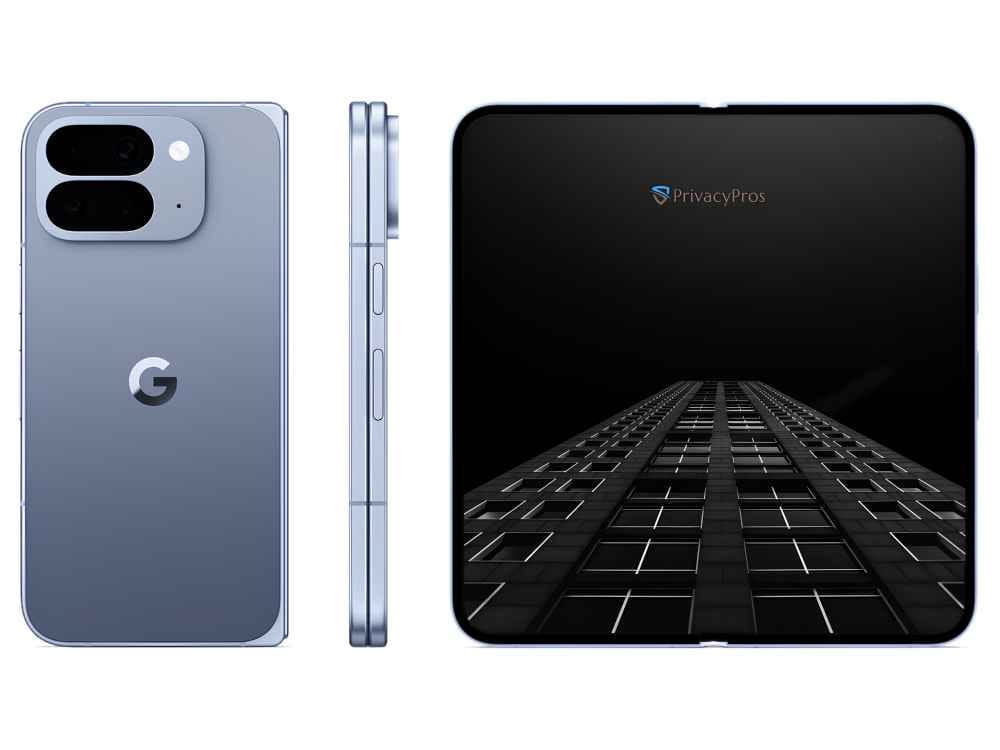
privacy phone australia 10 Pro Fold 1

-> Shop Privacy Phones

-> See all FAQs

best secure private anonymous phone privacypros australia

Yes, when the house runs locally. The phone is a remote. We do not configure your hub.

How a Privacy Phone works with a smart home

  • Install Home Assistant or openHAB on the phone. Join the same Wi-Fi as the hub.
  • Put the house apps in their own profile if you want them fenced off.
  • Sandboxed Play is there if a vendor app insists. It is off at dispatch.
  • A Google Home or Alexa house sends the building to someone else’s cloud. A local hub keeps that traffic on your network.
  • The phone does not invent that setup. It refuses to make a Google account the front door.

What works well with a Privacy Phone

  • Home Assistant Companion. Dashboards, automations, and voice on the hub, not in Google.
  • openHAB, if that is already the brain of the house.
  • Bluetooth devices. Pair, then let the radio sleep. Every Privacy Phone turns Bluetooth off after 10 minutes with no connection, so the handset is not sitting there advertising. Turn it back on when you next pair.

What a Privacy Phone adds to a smart home

  • The network tile cuts an app’s internet, so the companion can stay on local Wi-Fi only. See kill switches.
  • A separate profile puts the camera app in its own room, away from mail. See isolation features.
  • MAC randomisation makes the phone harder to follow from network to network. It does not make it invisible on your own Wi-Fi.

Google Home and Alexa on a Privacy Phone

Those apps expect a Google or Amazon account. They are not the default. If you still need one bridge, sandbox it and keep it off the profile you live in. A separate profile is the clean way. How to add the app is in install apps on a Privacy Phone.

Common questions

Will Home Assistant work without a Google account?

  • Yes. That is the point. The companion app talks to your hub.

Do you set up the smart home?

  • No. We ship the phone. The hub, the lights and the automations are yours.

Can a vendor camera app still phone home?

  • Yes, if you allow it the network. Put it in its own profile, and use the network tile when you want it local only.

-> Shop Privacy Phones

-> See all FAQs

best secure private anonymous phone privacypros australia

The greenest phone is the one you do not replace.

Current Pixels are built for a long support life. GrapheneOS keeps that window open. A handset you can still update in year six is a handset that does not become e-waste in year three.

How a Privacy Phone is the longer-life choice

  • We sell new Australian Pixel 9 and Pixel 10 phones, so the clock starts with years left, not a used phone already halfway through.
  • Google’s own figures for the Pixel 10 series put recycled content at least 32% by weight, including recycled aluminium in the enclosure and recycled cobalt in the battery. That is Google’s number, not ours.
  • Pixel 8 and newer carry up to seven years of security updates from launch. GrapheneOS ships patches for as long as that firmware exists.
  • A used phone with a tired battery and no manufacturer warranty often comes back as waste sooner. That is the refurbished phones page, not a carbon certificate.
  • We do not sell a short-life refurb dressed as a green phone.

What lasts on a Privacy Phone

The software years are the real saving. A phone you replace every two years costs more, in money and in materials, than a phone you keep. The seven-year window on current Pixels is the ceiling. GrapheneOS follows it. After Google stops the firmware, the useful life ends. Buy the generation with the years still in front of it.

The hardware content is Google’s. Recycled aluminium, recycled rare earths in the magnets, recycled cobalt in the cell, on their published figures for this generation. We do not add a second certificate on top of that.

Packaging from us is plastic-free, from the Pixel box through how we send it.

Common questions

Is a refurbished phone greener?

  • Sometimes on paper, because the shell already exists. In practice a tired battery and a short update life mean it is replaced sooner. New stock with years of patches left is the longer life. Used phones also have their risks.

Do you offset carbon?

  • No. We do not sell an offset. We sell a phone you can keep.

Does GrapheneOS extend the update window past Google’s?

  • No. It follows the firmware Google still ships. That is why the model you buy matters.

-> Shop Privacy Phones

-> See all FAQs

best secure private anonymous phone privacypros australia

We do ship overseas, however we build and support Privacy Phones in Australia first.

If you live outside Australia, contact us before you order. We quote the phone, the insured courier, and the terms. Nothing is dispatched until that quote is agreed and payment has cleared.

Process for overseas Privacy Phone orders

  • Send the model you want, Essential or Pro Bundle, and the destination.
  • We come back with a price and a transit estimate.
  • The phone is the same product: a new Pixel, de-Googled with GrapheneOS, configured before it ships.
  • The two-year manufacturer warranty is the Australian stock path. What that means in your country is part of the quote.
  • The website will show full export options when that lane is ready. Until then, it is contact us.

Common questions

Can I just check out and ship overseas?

  • Not yet. Contact us first. We confirm the destination, the courier and the terms before you pay.

Does the two-year Australian warranty apply overseas?

  • The manufacturer path is on Australian stock – see our policy. How a fault is handled in another country is confirmed in the quote. Do not assume a local shop will service a phone they did not sell.

Is GrapheneOS legal outside Australia?

  • Check with your local laws. GrapheneOS is free open-source software on a phone you own. Local identity rules for a SIM still apply in your country, the same way they do here.

Do you ship the Faraday bag and Proton with an overseas Pro Bundle?

  • Pro Bundle is the same build. What can be included in the export, and what Proton can activate in your country, is confirmed in the quote.

-> Contact Us

-> Shop Privacy Phones

-> See all FAQs

best secure private anonymous phone privacypros australia

The model is a phone you can run yourself. We do the hours before it ships, so you’re not sitting in a ticket queue.

Quick answer:

  • Every Privacy Phone ships with a Quick Start Guide and a full User Manual, written for Australian networks and apps.
  • Pro Bundle includes one 20-minute support call. Essential does not.
  • There is no unlimited one-on-one support after purchase. A longer walkthrough is a booked consultation.
  • A hardware fault, the screen, the battery or the board, sits on the two-year Australian manufacturer warranty. That is a separate path from a how-to question.
  • A flash-and-ship listing often leaves you with a forum link. Unlimited chat usually means a higher price or a thinner build. This split is deliberate.

What’s included with Privacy Phone support

  • The Quick Start Guide is enough to use the phone the day it arrives.
  • The User Manual covers migration, settings, apps, alternatives, Pro Tips, and the steps most people ask about. It is written for a beginner, and for someone who will push the system.
  • Pro Bundle adds one 20-minute call. Use it for the layout, not for a hardware fault. See Essential or Pro.

What is not included with support

We are a small team. We do not offer unlimited one-on-one support after purchase. That is how the price stays where it is, and how the hours go into the phone before it ships.

For a longer walkthrough, or an ongoing setup, book a consultation.

For everything else, use this order:

If something breaks on a Privacy Phone

Screen, battery, board. Two-year manufacturer warranty on every Privacy Phone. Use the warranty option on the contact form. Installing GrapheneOS does not void that on a new Australian Pixel.

Common questions

How long is the Pro Bundle support call?

  • Twenty minutes with one of our friendly team members.

What if I need more than the manual?

  • We provide ample links, tutorials and guidance in our User Manuals. If more support is required, consider booking a consultation.

Who do I contact in month 14 if the screen fails?

  • We provide warranty support for 2 years. Please use the path on the contact form.

Our goal is to set you up for success from day one.

-> Shop Privacy Phones

-> Book a Consultation

-> See all FAQs

best secure private anonymous phone privacypros australia

These terms sit on top of your rights under Australian Consumer Law (ACL). Nothing here limits those rights.

Quick answer:
  • Every Privacy Phone has a two-year manufacturer warranty on new Australian Pixel stock. Installing GrapheneOS does not void that cover
  • A fault in normal use, a screen, a battery or a board, follows the consumer guarantees. A major failure is a refund. A minor one is a repair or a replacement.
  • We do not accept change-of-mind returns. That is disclosed before you buy.
  • Once we have started sourcing or configuring, the sale is final. If you have only just paid and that work has not begun, usually the first 24 to 48 hours, contact us.
  • We do not transfer money for postage. A claimed fault gets a prepaid label or a collection, after we verify the order. We inspect the phone when it arrives.
How a warranty claim works

Use the contact form and choose Warranty, Returns and Cancellations. Tell us the order number and what failed. Photos help. We verify the order is ours.

If it is a claimed hardware fault, we send a prepaid return label or arrange collection. Send it in the original packaging with proof of purchase. We do not pay you, we pay the courier.

When the phone is back, we inspect it and liaise with the supplier. A confirmed fault is repaired, replaced, or refunded, as the consumer guarantees require. If the phone is not faulty, or the damage is not covered, we return it to you and the return cost is yours.

What is covered under the warranty

Manufacturing defects. A battery, a screen or a board that fails in normal use.

What is not covered under the warranty

  • Deliberate or accidental damage
  • Cosmetic damage (scratches, dents)
  • Liquid damage
  • General wear and tear
  • Repairs you organised yourself

Returns

These are configured devices. Returns follow Australian Consumer Law (ACL) for faulty or wrongly described goods. We do not accept a return because you changed your mind.

Cancellations

Once payment has cleared and we have started sourcing or configuring, the sale is final. The hours are the product. If that work has not started, use the same contact form. We will tell you whether a refund is still possible.

Common questions

Does GrapheneOS void the warranty?

  • No. On a new Australian Pixel, the manufacturer path still covers a hardware fault.

Can I return it if I change my mind?

  • No. Change of mind is not a consumer guarantee, and it is disclosed before purchase.

Who pays postage?

  • On a claimed fault, we send a prepaid label or arrange collection after we verify the order. We do not transfer money. If the phone comes back and there is no fault, or the damage is not covered, the return cost is yours and the phone goes back to you.

Can I cancel after I pay?

  • Only if we have not started sourcing or configuring, usually the first 24 to 48 hours. Contact us. Once the build has started, the sale is final.

What if I say it is broken and do not send it?

  • Nothing happens. No label is used, no refund is paid, and the order stands. A claim starts when the phone is back with us.

-> Shop Privacy Phones

-> See all FAQs

Our tool selection process for the Privacy Hub is designed to prioritise privacy, security, and anonymity while remaining practical and usable for everyday Australians.

We draw from our own experience, established privacy resources, communities, and best practices to help build digital resilience in our communities.

All tools featured are free (or have robust free tiers) and actively maintained. We regularly update our recommendations based on new audits, community feedback, and emerging threats.

Our Vetting Standards

  • Open-Source Preference: We strongly prefer open-source tools for transparency, community scrutiny, and verifiable code. This allows independent review and reduces the risk of hidden backdoors. Closed-source exceptions are rare and clearly noted.
  • Security and Independent Audits: Tools should demonstrate strong security through regular third-party audits by reputable firms, end-to-end encryption (E2EE) where applicable, and hardening against common threats such as tracking, fingerprinting, and data breaches.
  • Minimal Data Collection and Strong Policies: Tools must minimise unnecessary data logging, tracking, or sharing with third parties. They should follow principles of data minimisation, purpose limitation, and clear user consent. We avoid tools from jurisdictions with weak privacy laws or those tied to ad-driven business models.
  • No Ads, Trackers, or Invasive Features: Tools should block or avoid ads and trackers by default, with no telemetry or unnecessary permissions.
  • Usability and Accessibility: Tools should offer user-friendly interfaces with minimal learning curves, cross-platform support (mobile and desktop), and good compatibility with common devices and operating systems. We favour options that balance strong privacy with everyday convenience.
  • Active Development and Community Support: Tools should receive regular updates (ideally within the last 6–12 months), respond quickly to vulnerabilities, and be backed by active communities (e.g. GitHub activity). We assess long-term viability, user adoption, and incident history.
  • Australian Relevance and Compliance: Tools should respect Australian privacy laws (such as the Privacy Act 1988) and consider local threats like metadata retention. We prioritise options that work well on Australian networks and avoid those that conflict with national standards.
PrivacyPros Australia 2026 logo

With the end of support for Windows 10 on 14 October 2025, over 250 million PCs worldwide (including millions in Australia) will no longer receive security updates. This leaves them vulnerable to ransomware, zero-day exploits, and identity theft.

Upgrading to Windows 11 often requires new hardware, as approximately 70% of Windows 10 PCs do not meet the requirements (TPM 2.0, Secure Boot, and compatible CPU). Many users face costs of $1,000+ for a new machine.

Windows 11 also introduces significant new privacy risks, including enhanced telemetry and AI features such as Copilot and Recall (on Copilot+ PCs). Recall captures screenshots of your screen activity every few seconds for AI processing – raising serious concerns about invasive data collection and potential data leaks.

Microsoft Data Collection in Windows (2025)

Data CategoryWhat It CollectsPrivacy Impact
DiagnosticsCrash reports, device health, app usageProfiles user habits; sent to Microsoft
Typing/KeystrokesInput patterns (not passwords/content)Infers behaviour; limited opt-out
Mic/WebcamAccessed only with app permissionRisk of leaks if system is compromised
Files/BrowsingIndexed for search; history and settingsBuilds user profiles; telemetry-enabled
Location/HealthIf enabled in appsTracks movements and shares via services

Our solution:

Switch to our affordable, easy-to-use Privacy Laptops powered by Zorin OS Pro – a Linux-based operating system specifically designed for Windows and macOS users.

Zorin OS Pro offers zero telemetry (no tracking), is fully open-source, and provides strong security without invasive AI features or constant screenshot captures. Your personal data stays private by default.

Switching to a Privacy Laptop allows you to exit the constant tracking and data harvesting from Microsoft, Apple, and Google.

We purchase new Dell laptops and professionally configure them with Zorin OS Pro. There are no hidden tracking, forced updates, or heavy antivirus requirements – just faster, more secure computing where you own your data.

Why You’ll Love a Privacy Laptop:

  • Familiar Interface: 12+ desktop layouts that mimic Windows 10/11, macOS, or traditional Linux. Switch between them in seconds.
  • Security & Performance: Highly resistant to malware. Includes lightweight pre-installed antivirus, faster boot times, better battery life, and regular updates without slowdowns or forced reboots.
  • Ready-to-Use: Arrives professionally hardened and set up – just power it on and start working.
  • Growing Popularity: Zorin OS saw over 100,000 downloads in just 48 hours after the Windows 10 end-of-support announcement.

Watch this short overview of the Operating System (OS) we use.

Read More: Ditch Windows Nightmares: Why Linux is Your Ultimate Privacy PC.

-> Shop Privacy Laptops

-> See All FAQs

best secure private anonymous phone privacypros australia

Yes – every Privacy Laptop arrives with Zorin OS Pro fully loaded and a carefully selected bundle of privacy-focused apps pre-installed and optimised for security, usability, and performance.

These apps enhance your privacy, security, and anonymity while providing a familiar and productive experience for users switching from Windows or macOS.

Pre-Installed App Categories

  • Productivity and Office Suite
  • Creative and Media Suite
  • Utilities and Connectivity
  • Proton Ecosystem
  • Other Bundled apps

Productivity and Office Suite

  • LibreOffice Suite: Full office package (word processing, spreadsheets, presentations, databases, drawing). A direct, private alternative to Microsoft Office with excellent file compatibility.
  • Planify: Simple task manager for to-do lists, reminders, and project planning. Great for families and non-tech users switching from Windows To-Do or Outlook.
  • Xournal++: Note-taking and PDF annotation with handwriting and stylus support. A privacy-focused alternative to OneNote.
  • Logseq: Knowledge management and note-taking tool with markdown support and zero telemetry. Ideal for users moving from Evernote.
  • Scribus: Desktop publishing for brochures, newsletters, and PDFs. A pro-level but beginner-friendly alternative to Publisher or InDesign.
  • FreeCAD and LibreCAD: 3D and 2D CAD software for design and modeling. Secure, open-source alternatives to AutoCAD.
  • Foliate: Clean e-book reader with library management and annotations. No ads or telemetry.

Creative and Media Suite

Zorin OS Pro includes a professional-grade creative suite (valued at over $5,000 in equivalent proprietary software), all pre-installed and optimised for your hardware.

  • Kdenlive or PiTiVi: Advanced video editors with effects and multi-track support. Secure alternatives to Premiere Pro.
  • GIMP (with extras) or Krita: Powerful image editors and digital art tools. Photoshop-compatible with strong privacy.
  • Inkscape: Vector illustration tool for logos, diagrams, and design. A scalable alternative to Illustrator.
  • Ardour or Audacity: Professional and simple audio recording/editing tools.
  • Blender: Industry-standard 3D graphics, animation, and effects software (used in Hollywood).
  • Darktable: Raw photo processing and editing workflow. A privacy-respecting Lightroom alternative.
  • OBS Studio: Screen recording and streaming tool with local saving only.

Utilities and Connectivity

These handle everyday tasks securely, with Zorin OS Pro’s lightweight design ensuring 5-10s boot times and extended battery life.

  • Brave (default browser): Privacy-focused browsing with built-in tracker blocking.
  • Evolution: Email client with calendar and contacts. Easily integrates with Proton.
  • Zorin Connect: Securely syncs your Privacy Laptop with Privacy Phones over encrypted local networks (no cloud). Share notifications, files, and use your phone as a remote.
  • Network Displays: Wireless screen casting/mirroring for TVs and monitors.
  • Deskflow (formerly Barrier): Share one mouse and keyboard across multiple computers securely over local encrypted connections.
  • Other essentials: Rhythmbox (music), VLC (video), Transmission (torrents), VirtualBox (virtualisation), Remmina (remote desktop), and more.

Proton Ecosystem

As official partners with Proton, we pre-install their suite of Swiss-encrypted, zero-access, no-logs apps:

  • Proton Mail: Secure your communications with encrypted email (more info)
  • Proton VPN: Keep your online activity secure and private (more info)
  • Proton Drive: Organise your photos and files with secure cloud storage (more info)
  • Proton Calender: Organise your schedule privately (more info)
  • Proton Pass: Protect your online identity with an encrypted password manager (more info)
  • Proton Authenticator: Secure your online accounts with 2FA across devices (more info)
  • Standard Notes: Write and store private notes across your devices (more info)

Other Bundled Privacy Apps

We vet and pre-install other Bundled Apps for you to build digital resilience with privacy, security, and anonymity. This includes:

  • Mullvad Browser: Complements Brave for diverse, tracker-resistant browsing.
  • uBlock Origin: Powerful ad and tracker blocker.
  • ClamAV with ClamTK GUI: Lightweight antivirus for extra reassurance.
  • BleachBit: Secure system cleaner for wiping temp files and history.
  • Cryptomator: Encrypts files and folders for any cloud storage.
  • Onionshare: Anonymous Tor-based file sharing with no servers.

Why We Pre-Install These Apps

We carefully vet and configure every app so your laptop arrives ready to use with maximum privacy and minimal setup. This saves you significant time and helps you avoid the common pitfalls of DIY configurations.

-> Shop Privacy Laptops

-> See All FAQs

best secure private anonymous phone privacypros australia

PrivacyPros uses rigorously tested, brand-new Dell laptops sourced from official Australian suppliers. We currently offer two excellent models:

  • Dell Latitude 3340
  • Dell Pro 14 (PV14250)

Why These Dell Models?

We chose these specific laptops because they deliver outstanding compatibility, performance, and value for privacy-focused users:
  • Proven Linux Compatibility: 100% seamless integration with Zorin OS Pro. WiFi, Bluetooth, camera, trackpad, and all hardware components work out-of-the-box with no driver issues.
  • Quality and Reliability: Carefully vetted for performance. Upgrades ensure lightning-fast operation (around 5-second boot times), lag-free multitasking, and significantly better battery life compared to older Windows setups.
  • Everyday Power: Ideal for browsing, office work, streaming, video calls, and light productivity. RAM and SSD are upgradeable (on Pro models) for future-proofing.
  • User-Friendly for Everyone: Perfect for non-tech-savvy users and families transitioning from Windows or macOS.

What to Expect from Your Privacy Laptop

  • Seamless Experience: Hardware is fully compatible with zero driver installation required for WiFi, Bluetooth, camera, and other components.
  • Fast and Efficient: Lightweight Zorin OS Pro delivers ~5-second boot times, smooth performance, and up to 2x better battery life than many older Windows laptops. Easily handles 20+ browser tabs.
  • Familiar Interface: Quickly tweak the desktop layout to look and feel like Windows 11, older Windows versions, or macOS. Non-tech users and families transition easily.

Transform Your Laptop into a Desktop Setup

  1. Connect a compatible HDMI, DisplayPort, or USB cable to your monitor or display.
  2. Zorin OS automatically detects the screen – go to Settings > Displays to mirror or extend your desktop.
  3. Dual or triple screen setups are ready instantly – drag windows freely between screens.

Ready for secure, private, and user-friendly computing?

-> Shop Privacy Laptops

-> See All FAQs

best secure private anonymous phone privacypros australia

Our Privacy Laptops are powered by Zorin OS Pro – a secure, user-friendly Linux operating system specifically designed for privacy and ease of use.

If you’re not familiar with technical terms, think of the operating system (OS) as the “brain” of your laptop. It controls everything from opening apps and connecting to the internet to managing your files and security.

Zorin OS Pro is the premium version of Zorin OS (normally ~$80), and we include it at no extra cost to give you the best possible experience.

Why Zorin OS Pro?

Zorin OS is built on Linux, a free and open-source operating system trusted worldwide for its stability and security. Unlike Windows or macOS (which are closed-source, meaning only the company can see and modify the code), Zorin’s code is open for anyone to inspect and audit. This transparency helps quickly identify and fix security issues and ensures there are no hidden backdoors or invasive tracking.

Here’s why Zorin OS Pro stands out – especially if you’re switching from Windows:

  • Easy to Use for Beginners: It looks and feels very similar to Windows, with familiar menus, taskbars, and layouts. There’s no steep learning curve — you can start working or browsing immediately.
  • Built-in Privacy and Security: No hidden tracking, ads, or data collection. It blocks invasive features like telemetry (automatic data sending to companies) and forced AI tools. Our experts further “harden” the system with advanced privacy settings and pre-install the Proton ecosystem (Swiss-based encrypted tools) to maximise protection against hackers, viruses, and surveillance.
  • Full Control in Your Hands: You decide what runs on your laptop. There are no unwanted updates, forced features, or bloatware. It’s ideal for everyday tasks like email, web browsing, document editing, streaming, and creative work.
  • Pro Features for Productivity: Includes premium customisation tools, extra desktop themes, advanced file management, and excellent support for creative applications.
  • Why Linux Over Windows or macOS?: Standard operating systems from Microsoft and Apple often collect your data (search history, location, usage patterns) and share it with advertisers or other parties. Zorin OS Pro removes that entirely, giving you a privacy-optimised laptop without sacrificing performance or usability.

New to Linux? No Problem.

Linux is generally more secure than Windows (far fewer viruses target it) and runs smoothly on our hardware. We’ve extensively tested Zorin OS Pro to ensure excellent compatibility with common apps and peripherals.
Switching to a privacy-focused operating system is one of the smartest steps you can take toward reclaiming control of your digital life.

-> Shop Privacy Laptops

-> See All FAQs

best secure private anonymous phone privacypros australia

Yes – but our model focuses on self-reliance and long-term digital resilience rather than unlimited one-on-one support.

Unlike many transaction-focused sellers, we are genuinely invested in your privacy journey. That’s why we provide high-quality resources designed to help you succeed independently.

Every Privacy Laptop comes with a comprehensive Quick Start Guide (QSG) to get you up and running quickly with the basics. This includes curated learning resources, video links, and practical guidance. The QSG is carefully created to give you the basics that you need without creating dependency on constant external help.

Ongoing or Advanced Support

Because we are a small, mission-driven team focused on keeping prices as accessible as possible, we do not offer unlimited one-on-one support after purchase.

For more personalised help with advanced configurations or ongoing privacy strategy, we offer dedicated consultation services.

For everything else, the following resources are the fastest and most effective:

  • Your provided Quick Start Guide and User Manuals
  • This FAQ section
  • the Zorin OS documentation (Zorin Help)
  • the Zorin OS community forum (Zorin Forum)

Our Philosophy

We believe the best long-term privacy and computing experience comes from empowering users with excellent tools and clear guidance – rather than ongoing support tickets. Our goal is to set you up for success from day one with a system that is stable, private, and easy to maintain.

-> Shop Privacy Laptops

-> Book a Consultation

-> See All FAQs

best secure private anonymous phone privacypros australia

Our policies are designed with transparency and full compliance with Australian Consumer Law (ACL).

Warranty

All Privacy Laptops come with a 12-month Basic Onsite Service warranty.

We only purchase brand-new Dell laptops through official Australian distribution channels.

What the warranty covers:

  • Manufacturing defects and hardware failures

What the warranty does NOT cover:

  • Deliberate or accidental damage from abuse or misuse
  • Cosmetic damage (scratches, dents)
  • Damage from excessive force or improper use
  • Water or liquid damage
  • General wear and tear
  • Unauthorised repairs

How to make a warranty claim:

Contact us via our contact form with the inquiry type ‘Warranty, Returns & Cancellations’. After we verify your order, we will provide return instructions (including original packaging and proof of purchase). Return postage and handling fees are at your expense. We will then liaise with the supplier and advise you of repair, replacement, or other options.

Returns

Because our Privacy Laptops are custom-hardened privacy devices, returns are handled in accordance with Australian Consumer Law for non-standard goods. Remedies focus on faults or defects, not change of mind.

We clearly disclose this policy upfront. We are unable to accept returns for change of mind.

Cancellations

Sales are generally considered final once an order is placed, as we begin sourcing and configuring devices shortly after purchase.

However, we aim to be flexible and ethical:

  • If payment was very recent and we have not yet started sourcing or configuring your device (usually within the first 24-48 hours), we may offer a full refund for the product and postage at our discretion.

To request a cancellation, contact us via our contact form with the inquiry type ‘Warranty, Returns & Cancellations’.


Loading...